The Best Alternatives to MetaTrader 4 & 5 in 2026


Are you using MetaTrader but feeling like it’s not quite cutting it?
Maybe the interface feels clunky, backtesting is too complicated to do, or running it on Mac is a hassle. Some traders also struggle with slow customer support or are affected by regulatory restrictions. Whatever the reason, you’re not alone in looking for a better alternative.
If you’re searching for a platform that fits your needs, this guide breaks down the top MetaTrader replacements.
Let’s dive in.
What are the best MetaTrader alternatives?




Why switch from MetaTrader?
MetaTrader 4 launched in 2005, and MT5 followed in 2010. Both were groundbreaking at the time, but the trading world has moved on. Here are the most common frustrations traders run into:
- Outdated interface. The UI hasn’t changed much in over a decade. Compared to modern platforms, navigation feels clunky and customization options are limited.
- No true native Mac app. MetaTrader relies on compatibility layers like CrossOver to run on macOS. It works, but performance and stability don’t match a native application.
- Basic charting tools. The built-in indicators and drawing tools cover the essentials, but traders who need advanced technical analysis often have to rely on third-party add-ons.
- MQL is a niche language. Automating strategies requires MQL4 or MQL5, a proprietary language with far fewer resources and developers than Python, C#, or JavaScript.
- Broker-dependent data quality. MetaTrader pulls market data from your broker’s feed. Chart accuracy and speed vary depending on who you trade with.
If any of these sound familiar, the platforms below address them directly. Let’s dig in.
1. ProRealTime
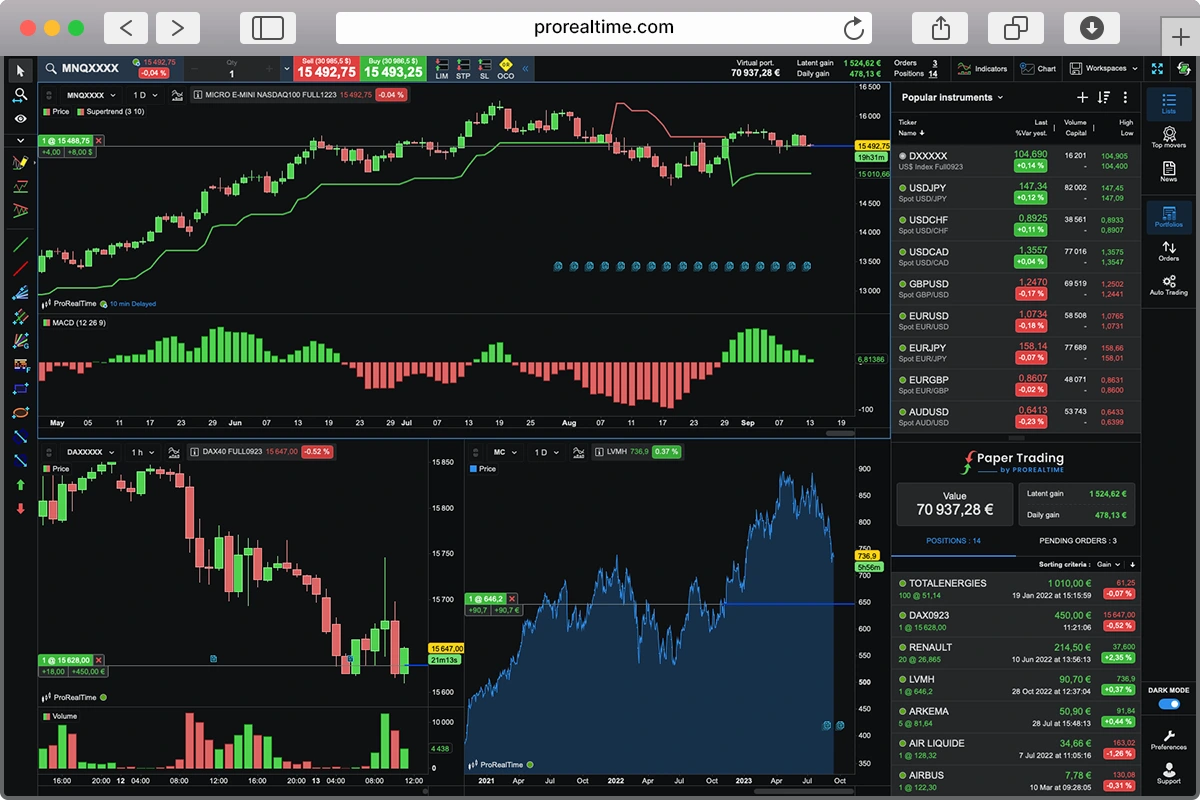
Operating since 2001, and with more than a million users worldwide, ProRealTime is simply the best trading platform available for retail investors. Although originally aimed at more experienced traders, ProRealTime’s free web and mobile versions also make it a perfect fit for newcomers to trading.
The platform’s paper trading capabilities let you build strategies without risk, then push them live when you’re satisfied. And its broker integrations give you direct market access with no effort.
ProRealTime is available in three versions:
- Web (free) – access charts and analysis tools from any browser.
- Mobile (free) – trade and monitor markets on the go.
- Desktop (free with end-of-day data) – real-time data and automation require a subscription.
ProRealTime makes automation easy, whether you prefer a no-code approach or want full control by coding your own strategies. Both options can be tested in a paper trading environment before going live, so you can fine-tune your setups risk-free.
Plus, the ProRealCode community is a great resource for traders to share, customize, and download scripts for technical indicators and automated strategies-helping you get up and running without starting from scratch.
Unlike MetaTrader, which relies on broker data feeds, ProRealTime connects directly to stock exchanges, providing high-quality market data straight from the source.
Its charting experience is modern and highly customizable, offering a wide range of technical analysis tools alongside multi-timeframe analysis, unlimited chart windows, and an extensive library of indicators. Traders can use classic drawing tools like trendlines and Fibonacci retracements, as well as advanced features such as volume profiles, market depth, and pattern recognition for deeper insights.
Traders also get access to dedicated phone support, which is a real advantage when you need help fast instead of relying on forums or ticket systems.
2. TradingView
Founded in 2011, TradingView is one of the most popular financial platforms around, serving more than 100 million users around the world. It’s widely regarded as a powerful yet accessible charting platform.
But thanks to its widespread popularity, TradingView is now essentially a social network, where traders connect with one another and collaborate on strategy. This access to other traders is rare.
TradingView works entirely in the cloud (web, desktop, and mobile) with an interface that’s intuitive enough for beginners but deep enough for professionals. Its charting tools are outstanding, with multi-timeframe analysis, deep customization, and an extensive library of indicators.
Unlike MetaTrader, which requires coding in MQL for automation, TradingView offers Pine Script, a more accessible scripting language that makes it easier to create custom indicators and strategies.
TradingView lets you take automation a step further by sending alerts from your easily scripted strategies directly to your broker, making it easier to execute trades without constant monitoring. In fact, many brokers are fully integrated with TradingView, allowing you to trade directly from the platform without needing to switch between different apps or interfaces.
But what many traders come for, and why they stick around, is the community. TradingView’s social networking features allow users to publish ideas, discuss strategies, and engage with a real-time trading community. This is especially valuable for new traders looking for guidance and insights, but even seasoned professionals use it to refine their strategies and gauge market sentiment.
Perhaps the biggest downside to TradingView is pricing, especially compared with MetaTrader and ProRealTime’s free web version. TradingView has a limited free tier, and paid plans range from around $13 to $200 per month depending on the features you need. That said, annual billing and occasional promotions can bring costs down significantly.
Overall, TradingView is a strong pick if you value modern charting, easier scripting, and community. Just make sure the subscription cost makes sense for your use case.
3. TrendSpider
TrendSpider is an advanced trading platform best suited to technical analysts, swing traders, and algorithmic traders who want to automate their market analysis. It leverages AI-driven charting tools, automated trendline detection, multi-timeframe analysis, and backtesting to help traders make more data-driven decisions.
Users speak highly of its backtesting capabilities and scanners, but find it very limited for live trading.
Unlike MetaTrader’s EAs, which require learning MQL, TrendSpider offers AI-driven trend detection and no-code strategy backtesting. If you prefer coding, it also supports JavaScript, a far more widely used language.
Its standout feature is automated charting: instead of manually drawing trendlines and scanning for patterns, TrendSpider’s AI detects them for you. Combined with one-click multi-timeframe analysis and customizable alerts, it keeps you on top of the market without staring at screens all day.
The interface is clean and modern, a noticeable upgrade from MetaTrader’s cluttered layout. TrendSpider’s main limitation is that it’s primarily an analysis and backtesting tool, not a trading execution platform.
4. cTrader
cTrader is designed mainly for forex and derivatives traders, particularly those who prefer ECN (Electronic Communication Network) trading. It offers advanced charting, fast order execution, and algorithmic trading to program custom strategies.
With a modern and intuitive interface, it appeals to traders looking for a user-friendly alternative to MetaTrader, while still providing direct market access and automated trading capabilities.
cTrader is built for forex traders who want faster order execution, better automation, and a modern interface. It supports forex pairs, major indices, ETFs, cryptocurrencies, and commodities like gold and crude oil. Unlike MetaTrader, which often relies on brokers using dealing desks, cTrader is designed to work with ECN/STP brokers, meaning orders are sent straight to liquidity providers without broker intervention.
Where it really stands out is algorithmic trading. cTrader supports both C# and Python for building automated strategies. Both are widely used languages with extensive resources and libraries. This makes it a more flexible option for developers compared to MetaTrader’s proprietary MQL, though its backtesting tools are more limited.
The interface is modern and easier to navigate, whether on desktop, web, or mobile. It also includes Level II pricing, showing real-time buy and sell orders directly from liquidity providers. This added visibility helps traders assess market depth and liquidity without price filtering from brokers.
One thing to watch out for is broker availability. While MetaTrader is supported by most brokers, cTrader has fewer options. It also operates on a commission-based model, so trading costs vary depending on the broker. Traders can explore charts without an account, but actual trading requires signing up with a broker that supports cTrader.
If you rely on MetaTrader’s vast ecosystem of indicators and add-ons, the transition may take some adjustment. But for forex traders who prioritize execution speed and a modern UI, cTrader is hard to beat.
How do these MetaTrader alternatives compare?
Here’s a side-by-side look at the four platforms across the features that matter most when switching from MetaTrader:
| Feature | ProRealTime | TradingView | TrendSpider | cTrader |
|---|---|---|---|---|
| Best for | Active traders who want execution + automation | Charting, community, and multi-asset analysis | AI-powered technical analysis and backtesting | Forex traders who want ECN access + modern UI |
| Pricing | Free (web & mobile). Desktop from ~$25/mo | Free tier available. Paid from ~$13/mo | No free plan. From ~$54/mo | Free (with a broker) |
| Automation language | ProBuilder (no-code available) | Pine Script | JavaScript (no-code available) | C# and Python |
| Direct market access | Yes (via IB, Saxo, IG) | Via integrated brokers | No | Yes (ECN/STP brokers) |
| Platforms | Web, desktop, mobile | Web, desktop, mobile | Web | Web, desktop, mobile |
| Charting | Advanced (volume profiles, market depth, pattern recognition) | Advanced (multi-timeframe, custom scripts, extensive indicators) | AI-driven (auto trendlines, auto pattern detection) | Advanced (Level II pricing, built-in indicators) |
| Community | ProRealCode (scripts & strategies) | Large social network (ideas, strategies, public scripts) | Limited | cTrader Store (bots, indicators, plugins) |
Which MetaTrader alternative should you choose?
This will always be a matter of personal preference, entirely dependent on how and why you trade. If you’re moving away from MetaTrader because of its outdated interface and limited out-of-the-box features, the options we just explored should answer your specific concerns.
- If you want best-in-class order execution and automation, try ProRealTime.
- For powerful custom charting and an incredible user network, look to TradingView.
- If you primarily need forex trading through ECN brokers and a very modern UI, try cTrader.
- If you don’t need direct order execution while charting but rely heavily on technical analysis and scanners, TrendSpider is a great choice.
For most users, ProRealTime is the obvious option to start with. You can explore the platform and features for free, and run simulations using paper trading before executing anything on the live market.
Whatever platform you choose, make sure it fits your strategy, risk tolerance, and trading style. The right tool can make a difference, but a sound trading plan is what truly drives success.
Frequently asked questions
Is MetaTrader still worth using in 2026?
MetaTrader still works, and it remains the most widely supported platform by brokers. But its interface, charting tools, and scripting language (MQL) are showing their age. If you’re happy with it, there’s no urgent reason to switch. But if you’re hitting limitations around charting, Mac compatibility, or automation, the alternatives on this list address those gaps directly.
What is the best free alternative to MetaTrader?
ProRealTime offers a free web and mobile version with no ads and no time limit. cTrader is also completely free when used through a supported broker. TradingView has a free tier, but it’s limited in features and includes ads. TrendSpider has no free plan.
Can I run automated strategies without learning MQL?
Yes. TradingView uses Pine Script, which is simpler to learn. TrendSpider supports JavaScript and also offers no-code backtesting. cTrader lets you build bots in C# or Python. ProRealTime has its own ProBuilder language with a no-code option as well. For a deeper look, see our guide to algorithmic trading.
Which MetaTrader alternative works best on Mac?
TradingView and TrendSpider are fully web-based and work natively on any browser, including macOS. ProRealTime also has a web version and a native Mac-compatible desktop app. cTrader offers a web platform and dedicated Mac app. All four are better options than running MetaTrader through a compatibility layer.
Do these platforms work with my existing broker?
It depends on the platform. TradingView integrates with a large number of brokers. ProRealTime connects to Interactive Brokers, Saxo, and IG. cTrader is available through select ECN/STP brokers like Pepperstone, IC Markets, and FxPro. TrendSpider is primarily an analysis and backtesting tool and doesn’t offer direct broker integration for trade execution.

Othmane has been swing trading for years and builds on experience in investment banking. He writes regularly about trading and market analysis, and has passed Level I of the CFA Program along with earning a double Master’s degree in Financial Analysis.