Best Trading Platforms: Our Top 7 Picks for 2026


Choosing the right trading platform is one of the first big decisions you’ll make as a beginner. With so many options available, each claiming to be the best, it’s hard to know where to start.
We focused on what beginner traders need most: easy access, essential features, and flexibility. After thoroughly testing the top platforms/apps, we’re sharing our recommendations to help you get started.
Let’s dive in.
Which Trading Platform is Best for Beginners?


Most retail traders lose money, that’s a fact backed by serious studies. So, if you’re just starting out, the last thing you need is a platform that pressures you to dive in headfirst. Instead, you need tools that let you practice, gain experience, and build confidence, all without risking a dime.
To help you get started, we ranked the top platforms based on three things beginners actually care about:
- Easy access means platforms that are quick to set up, offer free demos, and keep sign-up requirements minimal.
- Essential features are the must-haves: intuitive charts, reliable order execution, and tools to track your trades like a pro.
- Flexibility is about platforms that grow with you, offering customization, multi-asset support, and integration with different brokers.
Another note, this roundup includes both broker-owned and independent trading platforms. Not sure what those are? Here’s a quick breakdown:
| Type of Platform | What It Means for You |
|---|---|
| Broker-owned platforms | Built specifically for their respective brokers. They integrate tightly but lock you into that broker. Switching brokers? You’ll need to learn how to use a new trading platform from scratch. Examples include Trader Workstation (Interactive Brokers) or IG Markets. |
| Independent trading platforms | Made by tech companies. They work with multiple brokers, let you practice on demo accounts, and make switching brokers painless. Examples include TradingView, ProRealTime, or cTrader. |
We hope this roundup makes it easier for you to find a platform that fits your needs. Let’s dive in.
1 – ProRealTime
ProRealTime is an independent trading platform offering a free web and mobile version, alongside a Premium software option for advanced tools. The Premium version can be used independently or integrated with partner brokers, giving traders flexibility in their approach.
Launched by IT Finance, a French software company, ProRealTime is trusted by over a million users worldwide. It’s known since 2001 for its professional-grade tools and reliability.
ProRealTime is our top choice for beginners, offering a free web version that allows unlimited practice with stock charts, no deposits, ads, or upgrade prompts. You can trade without real money, making it the perfect platform to learn the basics of technical analysis stress-free.
For traders ready to level up and access advanced features, ProRealTime’s software version starts at $32 per month. It provides real-time data for U.S. stocks, European stocks, forex, and cryptocurrencies. With 66 drawing tools, market replay, and the powerful ProScreener tool for market scanning, this version is ideal for those seeking backtesting strategies, trading from charts.
The platform also excels in order execution, enabling traders to place, manage, and monitor trades directly from their charts. It integrates with top brokers, including Interactive Brokers (IBKR) in the U.S. and Europe, as well as IG markets and Saxo Bank for European customers, providing a flexible trading experience.
ProRealTime uses an independent datafeed to ensure low-latency, high-quality market data, delivered through direct fiber-optic connections to major exchanges. Real-time price updates are instantaneous, and users can analyze years of historical intraday and daily data. While the web version is free for practice, the software version offers a free trial to explore Premium features before committing. Our ProRealTime account setup tutorial can help beginners get started with this powerful platform.
2 – TradingView
TradingView is an independent platform that combines advanced charting tools with a thriving trading community. Its free version offers intuitive charts and essential features, making it a good starting point for beginners. Paid plans unlock additional tools and integrations, catering to traders of all experience levels.
Launched in 2011, TradingView has grown into a trusted platform for millions of traders worldwide. Known for its user-friendly design and collaborative features, it’s a top choice for those who want to pair technical analysis with community-driven insights.
TradingView stands out for its flexibility, powerful charting capabilities, and vibrant trading community. The free plan is a strong starting point for beginners, offering basic tools to get you started. However, its limitations, such as being restricted to five indicators per chart and two charts per tab, mean most traders will very quickly need to upgrade to a paid plan.
Paid plans start at roughly $155 per year and go up to $2,399.40 annually, offering features like multi-chart layouts, second-based intervals, and access to more indicators. These options make the platform scalable as your trading skills and needs grow. If you’re weighing your options, our comparison of TradingView alternatives breaks down the best options by category.
One of TradingView’s key strengths is its integration with multiple brokers via API. This allows traders to execute trades directly from the platform while maintaining a consistent setup, especially useful for managing multiple accounts or switching brokers.
Another standout feature is Pine Script, TradingView’s custom programming language. It enables users to create, share, and use custom indicators and strategies. This fosters a collaborative environment where traders exchange ideas and insights.
That said, the constant stream of shared content and the platform’s newsfeed can feel overwhelming for beginners, making it important to set clear priorities while using it.
3 – Trader Workstation (TWS)
Interactive Brokers’ flagship platform, Trader Workstation (TWS), offers access to over 150 global markets, covering a diverse range of assets like stocks, options, futures, forex, and bonds. Designed with flexibility and precision in mind, it’s a professional-grade tool for traders who demand advanced capabilities.
Since 1978, Interactive Brokers (IBKR) has been synonymous with low commissions and broad market reach. With TWS, IBKR gives you a platform that combines powerful tools with the scalability to meet the needs of both seasoned professionals and traders willing to master its features.
Trader Workstation (TWS) ranks third in our roundup, offering a powerful and flexible platform for traders who need advanced tools and global market access. To access TWS, all you need is an Interactive Brokers account, which requires no minimum deposit. The platform is completely free to use, and there’s even a demo mode, so you can explore its features and practice trading without any financial risk.
At first glance, TWS can feel overwhelming. The interface is packed with features and options that may intimidate beginners. However, the good news is that there are plenty of guides and resources available online to help you get started. For traders willing to learn, TWS offers exceptional customizability, allowing you to create layouts tailored to your strategies, whether you’re focused on day trading, options, or multi-asset portfolios.
A major highlight of TWS is its flexibility. While it’s a broker-owned platform, Interactive Brokers also integrates with top independent trading platforms like ProRealTime and TradingView, both of which rank highly in this roundup. This means you can take advantage of IBKR’s competitive execution while enjoying the advanced charting and analysis tools of these third-party platforms.
TWS’s advanced features include bracket orders, real-time risk analysis, and hotkeys for faster execution. These tools make it a strong choice for active and professional traders who want full control over their trading experience.
Pricing is another key advantage. There’s no cost to use TWS, and IBKR’s low commissions make it one of the most cost-effective platforms for serious traders. That said, the complexity of TWS can make it less suitable for beginners. But for those willing to invest the time, it’s a platform that offers unmatched flexibility and scalability.
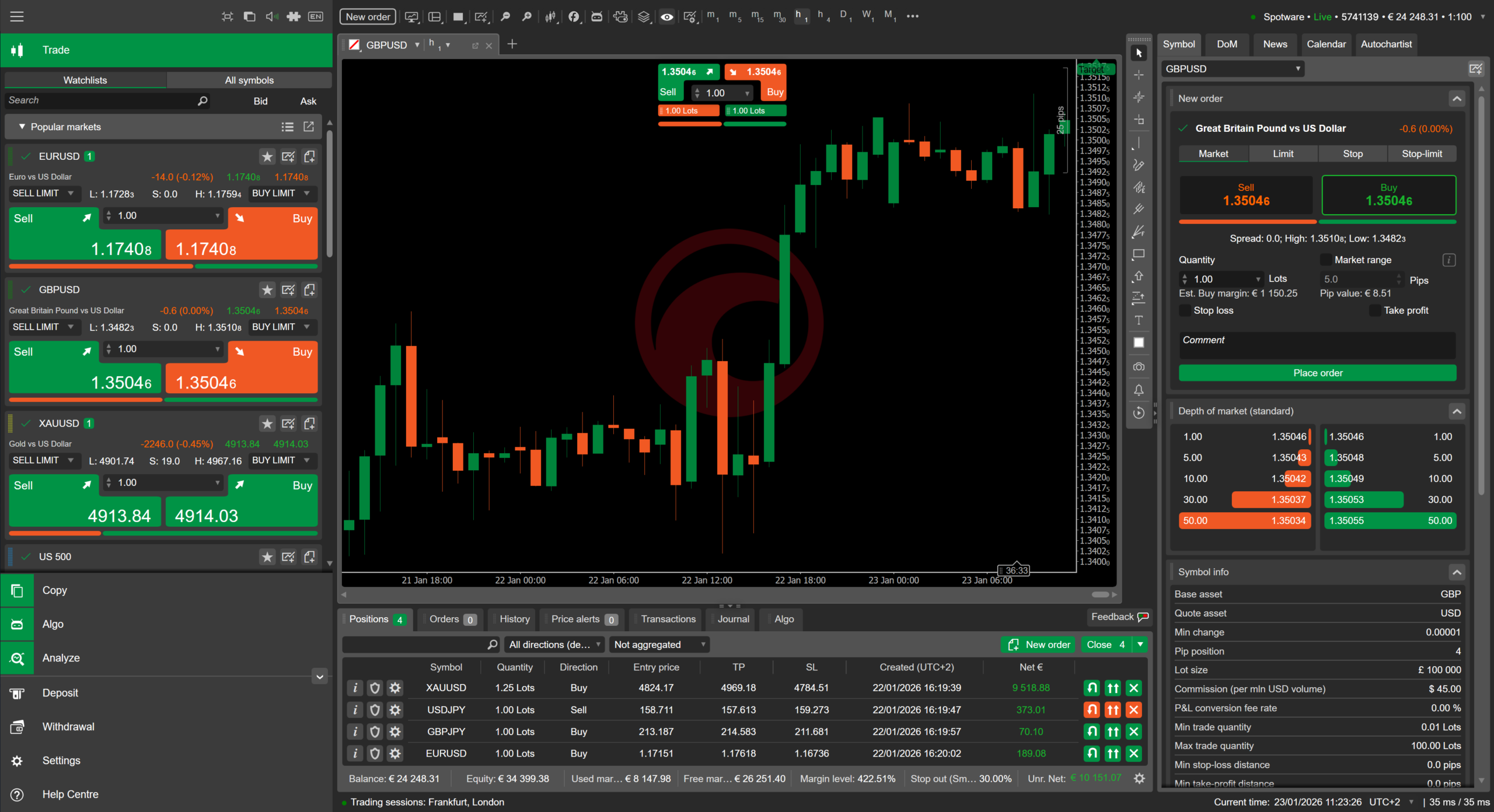
4 – cTrader
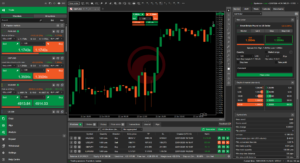
cTrader is an independent trading platform built by cTrader Ltd (formerly Spotware), a Cyprus-based fintech company. Used by major brokers and prop firms including IC Markets, Pepperstone, and FxPro, cTrader handles ECN/STP execution with full depth of market. Free cloud hosting for automated trading bots (cBots) and native Mac and mobile apps.
cTrader earned its spot for a reason most beginners overlook: execution quality. While other platforms route orders through dealing desks, cTrader connects directly to liquidity providers via ECN/STP. That means tighter spreads and faster fills, which matters more than most new traders realize.
The platform is free through partner brokers like IC Markets, Pepperstone, and FxPro. No platform fee, no subscription. You pay your broker’s spreads and commissions, nothing to cTrader itself.
For traders interested in automation, cTrader stands out with cBots (C#-based trading bots) and free cloud hosting to run them 24/7. The built-in backtesting engine lets you test strategies on historical data before risking real money. And unlike MetaTrader’s MQL, cTrader uses standard C#, which means a larger pool of developers and resources to learn from.
The main limitation: cTrader focuses on Forex and CFDs. If you need stocks, futures, or options, look at ProRealTime, TradingView, or Interactive Brokers instead. But for Forex and CFD traders who want clean execution and a modern interface, cTrader is hard to beat.
5 – Metatrader
MetaTrader is a globally recognized trading platform known for its advanced algorithmic trading capabilities and wide range of manual trading tools. Available in two versions, MetaTrader 4 (MT4) and MetaTrader 5 (MT5), the platform caters to traders of all levels, providing flexibility, speed, and access to multiple asset classes, including forex, stocks, and commodities.
First released in 2005 by MetaQuotes Software, MetaTrader has become a cornerstone in the trading industry, trusted by millions of traders worldwide for its reliability and versatility.
This roundup includes both broker-owned and independent trading platforms. Not sure what those are? Here’s a quick breakdown:
MetaTrader ranks fifth in our roundup due to its balance of advanced tools and widespread availability, though it’s best suited for traders who are ready to invest time learning its features. Its standout feature is algorithmic trading, powered by Expert Advisors (EAs), which allow you to automate strategies based on precise rules. This capability is particularly useful for traders focused on forex or those interested in hands-free trading.
MetaTrader offers strong charting capabilities, with built-in indicators and customizable scripts, allowing traders to tailor their setups. While it’s available for free through many brokers, the platform’s functionality depends heavily on the broker you choose: fees, market data quality, and support can vary significantly.
For beginners, the steep learning curve and technical nature of the platform can be a hurdle. However, the active MetaTrader community is a valuable resource, offering forums, tutorials, and pre-built strategies to help new traders get started. The platform also supports demo accounts, enabling users to practice risk-free with real-time market data provided by their broker.
If you’re looking for a platform with advanced trading tools and the flexibility to grow alongside your skills, MetaTrader is a strong contender, but be prepared to invest time in learning its features and finding a reliable broker to maximize its potential.
6 – IG Markets

IG Markets is one of the world’s largest CFD brokers, founded in 1974 and listed on the London Stock Exchange. With access to 19,000+ markets and regulation by the FCA, BaFin, and ASIC, IG combines its own proprietary platform with integrations for ProRealTime and TradingView.
IG Markets makes this list because it bridges two worlds: it’s a full-service broker with its own proprietary platform, but it also integrates with ProRealTime and TradingView. That means you can open one IG account and choose whichever charting environment suits you best.
The proprietary IG platform covers the basics well: clean charts, one-click trading, alerts, and a solid mobile app. For beginners, it’s intuitive enough to start trading without a steep learning curve. For more advanced analysis, connect your IG account to ProRealTime or TradingView and get professional-grade tools without switching brokers.
IG gives you access to 19,000+ markets including forex, indices, commodities, shares, and crypto. It’s regulated by the FCA (UK), BaFin (Germany), and ASIC (Australia), which means strong client protection. European clients benefit from negative balance protection and segregated funds.
The main drawback: IG is primarily a CFD broker, so you’re trading contracts for difference rather than owning the underlying asset. Spreads are competitive but vary by market. There’s also an inactivity fee if you don’t trade for two years. For active traders in Europe, though, IG’s combination of market access, regulation, and platform flexibility makes it a strong contender.
7 – NinjaTrader
NinjaTrader is a futures-focused platform and brokerage with over 2 million accounts since 2003. It features C#-based strategy automation (NinjaScript), tick-level backtesting, and order flow tools. Available in Europe since January 2026 via CySEC regulation. Commissions start from $0.09 per side on micro contracts.
NinjaTrader is the odd one out in this list, and that’s exactly why it’s here. While every other platform tries to be everything to everyone, NinjaTrader does one thing: futures. And it does it better than anyone else at this price point.
The platform runs on desktop only (no web, no mobile) and uses NinjaScript (C#) for strategy automation. The backtesting engine works at the tick level, which means your historical tests reflect actual market microstructure, not just candlestick closes. For systematic traders, that precision matters.
NinjaTrader also doubles as a broker with some of the lowest futures commissions in the industry: $0.09 per side on micro contracts. European traders can access it since January 2026 through CySEC regulation. You can also use NinjaTrader as a platform only, connected to Interactive Brokers or other supported brokers.
The learning curve is real. NinjaTrader is not beginner-friendly out of the box. But if you’re drawn to futures trading and want a platform that won’t hold you back as your skills grow, the lifetime license option (one-time payment instead of monthly subscription) makes it a smart long-term investment.
What Should You Look For in a Trading Platform
Choosing your first trading platform is a crucial step in your trading journey. While each platform we’ve reviewed has its strengths, there’s no universal “best” choice. It depends entirely on your specific needs, goals, and the type of assets you wish to trade.
If you’re completely new to trading, ProRealTime’s free web version offers a stress-free environment to learn the basics without pressure, making it ideal for beginners focused on stocks and technical analysis. TradingView shines for those who value community insights and want to learn from others. For traders seeking more advanced brokerage features and global market access, Interactive Brokers’ TWS is the go-to, despite its steeper learning curve. It’s perfect for those who want to trade everything from equities to options and futures on a global scale. If you’re focused on Forex and want clean ECN execution, cTrader is worth a close look. European traders who want wide market access with strong regulation should consider IG Markets. And if futures are your focus, NinjaTrader specializes in that space with tick-level precision and low commissions.
Remember, the platform you start with doesn’t have to be your forever choice. Many successful traders begin with simpler platforms and graduate to more sophisticated tools as their skills grow. The key is to choose a platform that matches your current skill level while providing room to grow.
Before committing to any platform, take advantage of the free trials and demo accounts.
Test the features that matter most to you, whether that’s charting tools, order execution, or educational resources. And most importantly, never forget that no platform, no matter how sophisticated, can guarantee trading success. Focus on learning the basics of day trading, developing your strategy, and understanding the assets you want to trade before risking real capital.
What is a Trading Platform?
A trading platform is the software you use to buy and sell investments through a broker, your gateway to the financial markets. It lets you trade stocks, bonds, currencies, and other investments while tracking prices and managing your portfolio.
Trading platforms come in two flavors. Some are independent, like MetaTrader, TradingView, and ProRealTime. These connect with various partner brokers, giving you the freedom to choose who you trade with. Others are built by brokers themselves specifically for their customers.
Most modern platforms offer mobile apps that sync with your desktop account, giving you real-time (or near real-time) market data, charts, research tools, and news. This means you can track and trade from anywhere using your computer or phone.
What is the safest trading platform?
While no platform can protect you from capital losses, the safest ones come from brokers regulated by major authorities like the SEC (Securities and Exchange Commission) in the US, the FCA (Financial Conduct Authority) in the UK, and ESMA (European Securities and Markets Authority) in the EU. Look for trading platforms with strong security features like two-factor authentication and encryption, plus a solid track record in the industry. Well-known examples include Interactive Brokers, IG Markets, and ProRealTime (via regulated partner brokers).
Remember that safety goes beyond the trading platform itself: choose a regulated broker, enable all security features, protect your login details, and check if your broker offers investor protection like the SIPC (Securities Investor Protection Corporation) in the US or the FSCS (Financial Services Compensation Scheme) in the UK.
What is the best free trading platform?
ProRealTime’s web version is completely free with no time limits, ads, or feature restrictions on charts. TradingView has a free tier but limits you to five indicators per chart and two charts per tab. MetaTrader is free through most brokers. cTrader is free through partner brokers. The best “free” depends on what you trade: ProRealTime for stocks and futures charting, MetaTrader or cTrader for forex.
What is the best trading platform in Europe?
For European traders, the key factors are regulation (FCA, BaFin, ESMA compliance) and market access. Interactive Brokers gives you the widest market access globally. IG Markets covers 19,000+ instruments with FCA and BaFin regulation. ProRealTime integrates with European brokers like IG and Interactive Brokers.
Can I use multiple trading platforms at the same time?
Yes, and many serious traders do. A common setup is using an independent charting platform (like ProRealTime or TradingView) for analysis, connected to a broker (like Interactive Brokers or IG) for execution. This gives you the best charting tools without being locked into one broker’s interface.
How much does a trading platform cost?
Costs range from completely free to over $2,000 per year. ProRealTime’s web version and MetaTrader are free. TradingView’s paid plans run from about $13 to $60 per month. NinjaTrader offers a lifetime license as a one-time purchase. Most broker-owned platforms (TWS, IG) are free to use if you have an account with that broker.

Othmane has been swing trading for years and builds on experience in investment banking. He writes regularly about trading and market analysis, and has passed Level I of the CFA Program along with earning a double Master’s degree in Financial Analysis.
Our top picks