cTrader Review 2026: Features, Pricing, and Honest Verdict

11 million traders use cTrader. That’s not a typo. A platform most retail traders have never tried now serves more users than some of the biggest names in the industry.
Built by Spotware, a Cyprus-based fintech company with 150+ developers, cTrader has grown from a niche ECN platform to a serious contender adopted by 300+ brokers and prop firms, including IC Markets, Pepperstone, and FxPro.
In this cTrader review, we’ll cover:
- The platform’s real strengths (and where it falls short)
- Pricing: what you actually pay
- Charting, algo trading, and copy trading features
- Who it’s built for, and who should skip it
cTrader: A Quick Overview
Spotware launched cTrader in 2011 with a clear focus: execution transparency and trader experience. The company is based in Limassol, Cyprus, with a team of 150+ in-house developers.
cTrader was designed from the start for ECN and STP brokers. That means no dealing desk, no requotes, and full depth of market visibility by default.
The numbers back up the traction. Over 300 brokers and prop firms now integrate cTrader, including IC Markets, Pepperstone, FxPro, FP Markets, Axiory, and TopFX. The platform serves 11 million active traders across 23 languages.
In 2025, cTrader won multiple “Best Trading Platform” awards across APAC, LATAM, MEA, and global categories. It’s no longer a niche tool. It’s the most widely adopted ECN-focused trading platform in retail forex.
Our Take on cTrader
cTrader is a clean, fast, ECN-focused platform that excels at execution speed, interface design, and depth of market transparency. It’s not a multi-asset powerhouse. It’s a specialist tool for forex and CFD traders who care about how their orders get filled.

cTrader is a free forex and CFD trading platform built by Spotware, used by 300+ brokers and prop firms including IC Markets, Pepperstone, and FxPro. It features ECN/STP execution with full depth of market, native Mac and mobile apps, and free cloud hosting for automated trading bots (cBots).
About cTrader:
Developed by Spotware (est. 2010, Limassol, Cyprus), cTrader launched in 2011. The platform now serves 11 million active traders across 23 languages, with a team of 150+ in-house developers.
Who Is cTrader For?
If you trade forex or CFDs and you want a platform that’s fast, transparent, and doesn’t feel like it was designed in 2005, cTrader is worth a look.
Three types of traders get the most out of it:
Scalpers and active day traders. cTrader’s execution speed is measured in milliseconds. The one-click trading, detachable charts, and Level II pricing make it a faster workflow for high-frequency manual trading.
Algo traders who know C#. If you code in C# (or want to learn), cTrader Algo gives you a modern IDE, free cloud hosting for your bots, and backtesting with tick data. No proprietary language to learn.
Copy traders. cTrader Copy is built into the platform. No third-party plugins, no Telegram signal groups. You browse strategy providers, check their verified track records, and allocate capital directly.
Skip cTrader if you need exchange-traded stocks, futures, or options. The platform supports stock CFDs through some brokers, but it doesn’t connect to stock or futures exchanges. Also skip it if you rely heavily on a large library of pre-built indicators: the cTrader ecosystem has ~1,100 indicators and ~780 cBots, which is solid but a fraction of MetaTrader’s marketplace.
cTrader Pricing: How Much Does It Cost?
cTrader itself is free. You don’t pay Spotware anything to use the platform.
Your costs come from the broker you choose. Since cTrader only works with ECN/STP brokers, the typical pricing model is raw spreads plus a commission per lot. Here’s what the major cTrader brokers charge:
| Broker | Spreads | Commission (round turn) |
|---|---|---|
| IC Markets | From 0.0 pips | $3 per $100k traded (~$7.80/lot on EUR/USD) |
| Pepperstone | From 0.0 pips | $6.00 per lot |
| FP Markets | From 0.0 pips | $6.00 per lot |
| FxPro | From 0.0 pips | $7.00 per lot (or $35/million) |
Since cTrader only works with ECN/STP brokers, all accounts use raw spreads plus a commission. There are no commission-free accounts with wider spreads like you’d find elsewhere.
cTrader Copy fees are separate. Strategy providers can charge up to 30% on profits, 10% annual management fees, or $10 per million in volume. You see these fees before you copy anyone.
If you use the cTrader Store to buy indicators or cBots, prices vary by seller. All purchases come with a 14-day money-back guarantee through Nuvei.
Comparing cTrader with Competitors
How does cTrader stack up against the platforms you’re probably already considering? (Read our full reviews: MetaTrader, TradingView, ProRealTime)
| Feature | cTrader | ProRealTime | MetaTrader 5 | TradingView |
|---|---|---|---|---|
| Cost | Free | Free (limited) / from €13/mo | Free | Free (limited) / $13-$60/mo |
| Markets | Forex, CFDs | Forex, CFDs, stocks, futures | Forex, CFDs, stocks, futures | All (via broker) |
| Timeframes | 54 | 18 | 21 | 20+ custom |
| Chart types | Tick, Renko, Range bars | Advanced (100+ indicators) | Standard + Renko | Extensive |
| Algo language | C# | ProBuilder | MQL5 (proprietary) | Pine Script |
| Algo hosting | Free cloud | Included with platform | Requires VPS | N/A |
| Copy trading | Built-in | No | Via signals (limited) | Via broker |
| Mac support | Native | Web + native | Via Wine/Parallels | Web-based |
| Execution model | ECN/STP only | Depends on broker | Any (incl. dealing desk) | Depends on broker |
| Backtesting | Tick data + optimization | ProBacktest (advanced) | Basic | Pine Script replay |
Each platform has a sweet spot. cTrader is best for forex and CFD traders who want fast execution and a clean interface. ProRealTime is the go-to for technical traders who need advanced charting and serious backtesting. MetaTrader 5 gives you the largest ecosystem and multi-asset coverage. TradingView is unmatched for chart analysis and community.
If you trade forex and execution quality matters to you, start with a free cTrader demo.
cTrader Charting and Analysis Tools
Most traders who switch to cTrader mention the charts first. The difference is immediately visible.
cTrader supports 54 timeframes. Beyond the standard minute, hourly, and daily charts, you get tick charts, Renko charts, and Range bars. If you trade price action or use non-time-based analysis, this matters.
The platform includes 65+ built-in indicators and 30+ drawing tools. The rendering is noticeably smoother than most competitors. You can also install custom indicators from the cTrader Store (1,093 available as of early 2026) or build your own in C#.
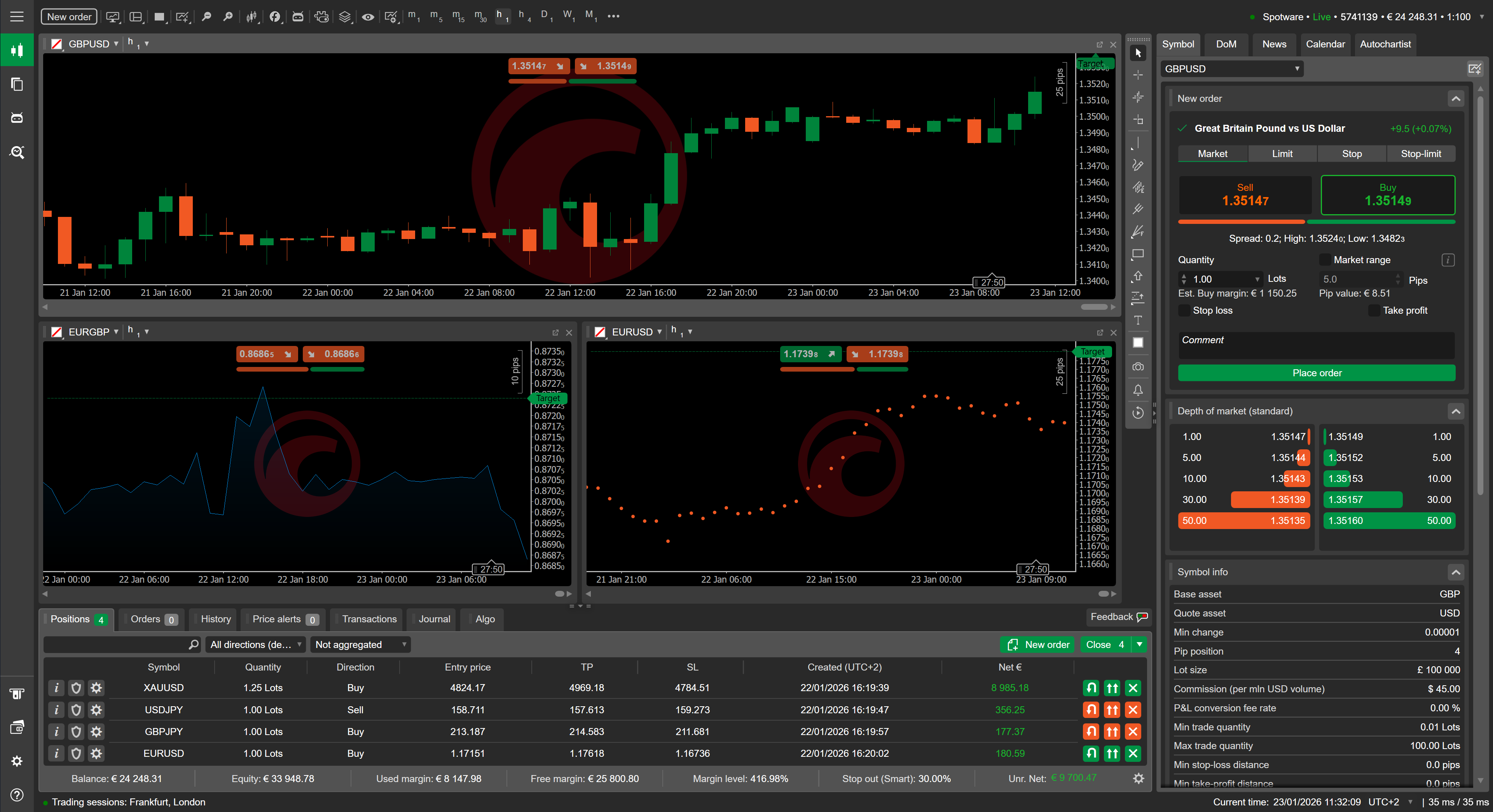
Multi-chart layouts are a standout feature. You can detach any chart window and drag it to a second monitor. The layout saves automatically. No workarounds needed.
Depth of Market (Level II) is always visible. You see the full order book with bid/ask volumes at each price level. This isn’t hidden behind a premium tier. Every cTrader user gets it.
One thing cTrader doesn’t have: a built-in community or idea-sharing feature like TradingView. It’s a trading tool, not a social platform. If you want chart analysis from other traders, you’ll need to look elsewhere.
cTrader Algo: cBots and Automated Trading
This is where cTrader gets interesting for systematic traders.
cTrader Algo (formerly known as cAlgo) lets you build, test, and run automated strategies called cBots. The programming language is C#, running on .NET 6.0+. If you’ve worked with any modern programming language, C# will feel familiar. No proprietary language to learn.
Three ways to automate:
- Strategy Builder (no-code). Drag-and-drop interface for building strategies from conditions and indicators. Good for testing simple ideas without writing code.
- Code editor. A full IDE built into the platform with IntelliSense, debugging tools, and access to the .NET ecosystem. You can import external libraries, connect to APIs, and build complex multi-asset strategies.
- cTrader Store. Browse 784 pre-built cBots from third-party developers. Each listing shows backtesting results (ROI, profit factor, max drawdown, win rate) so you can evaluate before buying.
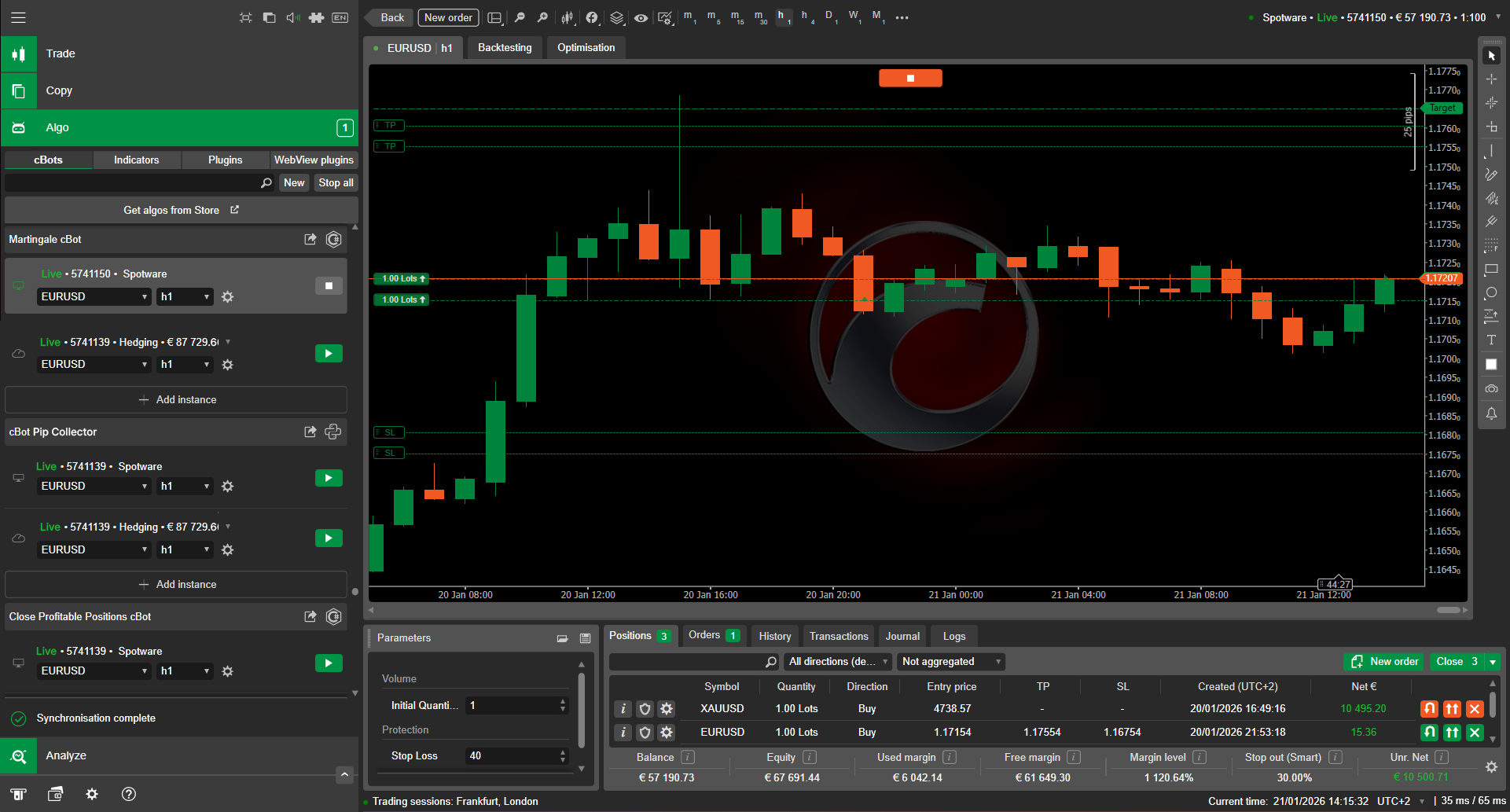
The killer feature: free cloud hosting. Your cBots run on Spotware’s servers, 24/7, across all platforms (desktop, web, mobile). No VPS rental ($10-30/month elsewhere). No leaving your computer on overnight.
Backtesting uses historical tick data, and the optimization engine can run walk-forward analysis. It’s not as deep as dedicated backtesting software like QuantConnect or Adaptrade, but for most retail algo traders, it’s more than enough.
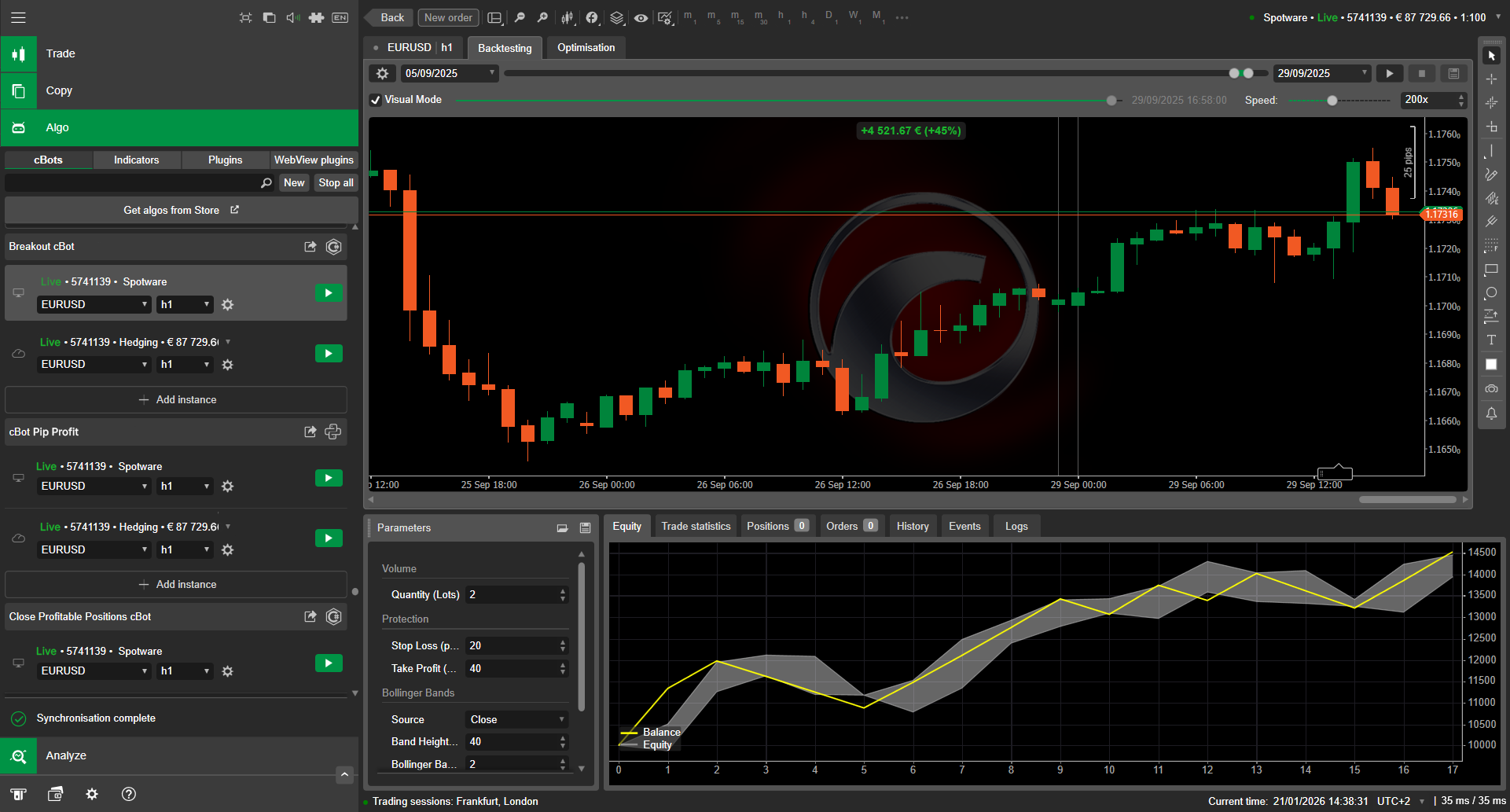
One caveat: the cBot ecosystem (~784 bots) is smaller than MetaTrader’s EA marketplace (10,000+). If you want a pre-built bot for a very specific strategy, you’ll find more options elsewhere. But if you build your own, cTrader’s development environment is hard to beat.
cTrader Copy Trading
Tired of sketchy Telegram signal groups? cTrader Copy takes a different approach.
It’s built directly into the platform. No plugins, no third-party apps. You open the Copy tab, browse strategy providers, and check their verified track records. Every provider’s performance is tracked by the platform itself, not self-reported.
How it works:
- Strategy providers trade their own accounts normally
- You choose a provider and allocate a portion of your capital
- Trades are copied proportionally to your account in real time
- You can stop copying at any time
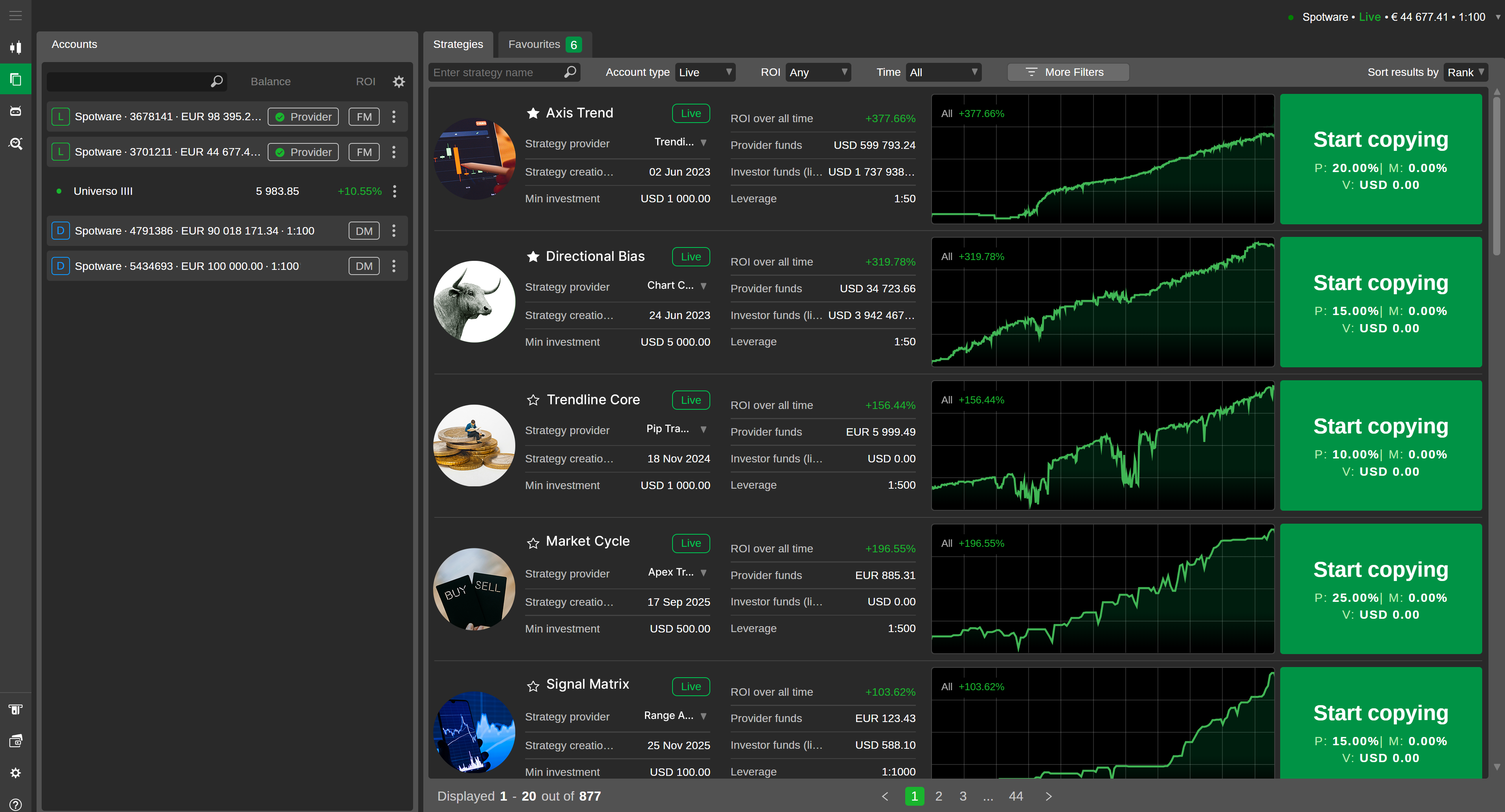
Fee structure: Providers set their own fees. The maximum is 30% profit share, 10% annual management fee, or $10 per million in volume. You see exactly what you’ll pay before committing.
The main limitation: copy trading availability depends on your broker’s regulatory status. Not all cTrader brokers activate the Copy feature. Check with your broker before choosing one specifically for copy trading.
Compared to eToro or other copy trading platforms, cTrader Copy has fewer strategy providers but connects you to ECN execution rather than a dealing desk. The performance data is also more standardized: verified by the platform, not self-reported by providers.
cTrader User Experience and Accessibility
cTrader runs on every major platform with native support for each one.
Desktop (Windows + macOS). The desktop app is where cTrader shines. Native Mac support arrived in recent years, and it runs without virtualization. The interface is dark-mode by default, fully customizable, and supports multi-monitor setups with detachable windows. You can drag charts, watchlists, and order panels to separate screens.
Web. The browser version covers about 90% of what the desktop app does. You get charting, one-click trading, the full order book, and account management. No installation needed. It runs in any modern browser.
Mobile (iOS + Android). The mobile app includes real-time charting, advanced order types (brackets, trailing stops), a risk-reward calculator, and price alerts. You can even monitor your cBots from your phone. It’s also available on Huawei AppGallery and Amazon Appstore.
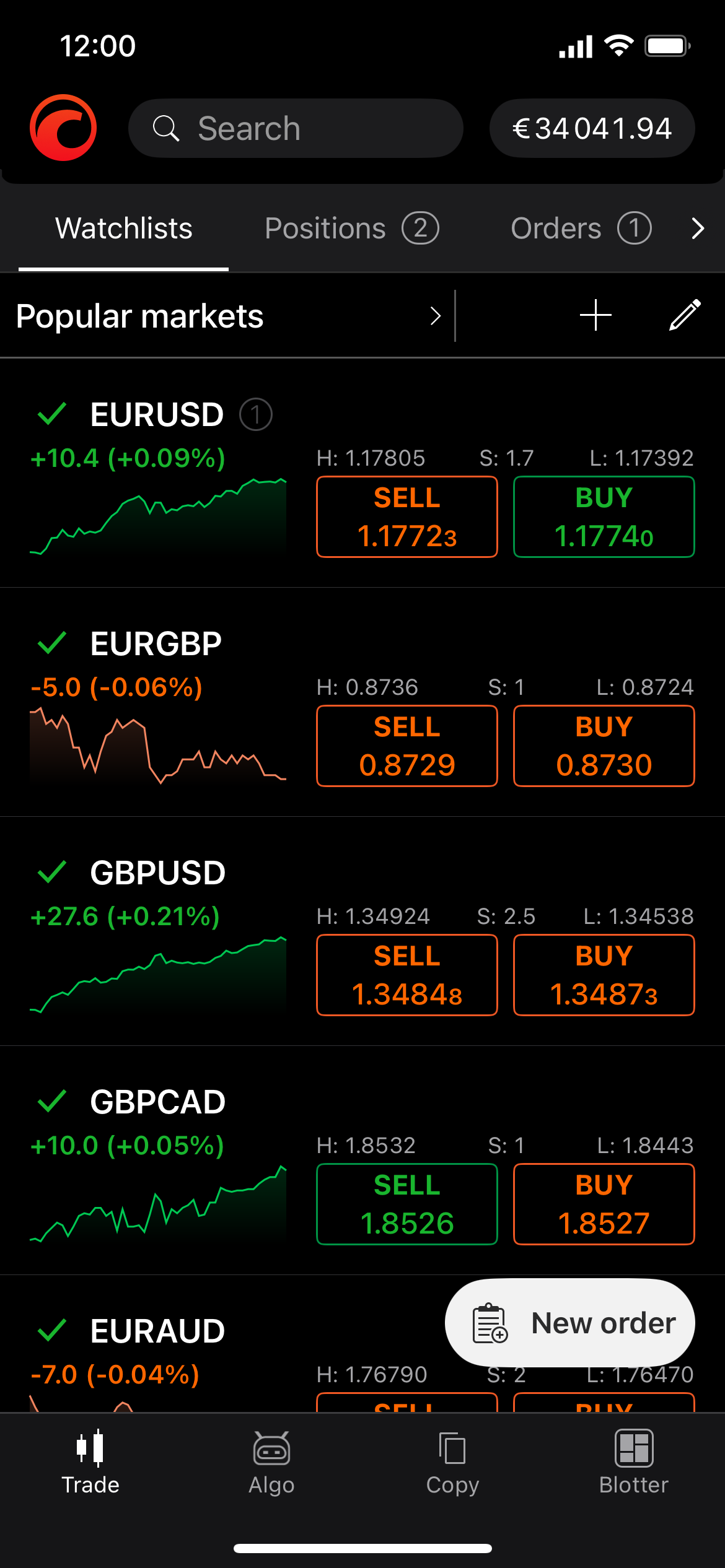
The learning curve is low. The interface is intuitive, with clear labels and logical menu structures. If you’re switching from another platform, expect a few days to adjust to the layout, but most traders find it faster once they do.
One complaint from Trustpilot reviews: cTrader uses more CPU than some competitors on certain systems. If you run the platform alongside other resource-heavy applications, you might notice the difference.
Is cTrader Legit?
cTrader is developed by Spotware Systems (now cTrader Ltd.), a company that’s been operating since 2010. The platform launched in 2011. That’s 15 years of continuous development.
Spotware itself is not a broker. It’s a technology provider. The company is registered in Cyprus (78 Spyrou Kyprianou, Magnum Business Center, Limassol) and builds the platform that brokers white-label and offer to their clients.
The brokers using cTrader are the ones holding your money and executing your trades. Major cTrader brokers include:
- IC Markets (ASIC, CySEC, FSA regulated)
- Pepperstone (FCA, ASIC, CySEC, DFSA regulated)
- FxPro (FCA, CySEC, FSCA regulated)
- FP Markets (ASIC, CySEC regulated)
These are some of the most heavily regulated retail brokers in the world. If you choose a reputable cTrader broker, your funds are protected by segregated accounts and regulatory oversight.
cTrader is not available to US residents. This is a regulatory restriction, not a red flag. Most forex/CFD platforms serving retail traders outside the US operate under similar limitations.
cTrader Customer Reviews
Trustpilot tells a clear story. cTrader holds a 4.8 out of 5 rating across 1,850+ reviews. The score distribution is heavily positive:
| Rating | Count | % |
|---|---|---|
| 5 stars | 1,580 | 86% |
| 4 stars | 163 | 9% |
| 3 stars | 27 | 1% |
| 2 stars | 17 | 1% |
| 1 star | 63 | 3% |
What users praise most: fast execution, clean interface, the risk-reward tool, and responsive customer support (Spotware’s team often replies directly to reviews).
The recurring complaints:
- Higher CPU usage on some machines
- Fewer currency pair configuration options than some traders want
- Occasional display glitches requiring a restart
- Some users confuse broker issues (withdrawals, spreads) with platform issues
That 4.8 rating is unusually high for a trading platform. For comparison, NinjaTrader sits at 3.7/5, TradingView averages around 4.2/5, and ProRealTime holds 4.5/5.
The negative reviews mostly come from traders who had issues with their broker, not with cTrader itself. It’s worth separating the two when you read reviews.
Final Words
cTrader does one thing well: forex and CFD trading with transparent ECN execution. Clean charts, a modern interface, native Mac support, free cloud hosting for your bots, and a platform that costs nothing to use. For traders who care about how their orders get filled, it’s hard to beat at the retail level.
It won’t cover every need. No exchange-traded stocks, futures, or options. A smaller ecosystem than some competitors. Not available in the US. But within its scope, cTrader delivers.
The best way to decide is to open a free demo account with IC Markets, Pepperstone, or FP Markets and trade on it for a week. You’ll know within a few sessions whether it fits your workflow.
Looking for other platforms? Check our best trading platform roundup or our detailed reviews of MetaTrader, TradingView, and ProRealTime.
FAQ
Is cTrader free to use?
Yes. The platform itself costs nothing. Your trading costs (spreads and commissions) come from the broker you choose, not from Spotware. Most cTrader brokers charge raw spreads from 0.0 pips plus a commission of $6-8 per standard lot round turn, depending on the broker.
Is cTrader better than MetaTrader 5?
For forex and CFD trading, cTrader has a more modern interface, faster execution, and better depth of market visibility. MT5 wins on multi-asset support (stocks, futures, options) and ecosystem size (more EAs and custom indicators). If you only trade forex, cTrader is worth trying.
Which brokers support cTrader?
Over 300 brokers support cTrader. The most popular include IC Markets, Pepperstone, FxPro, FP Markets, Axiory, and TopFX. All of these are regulated by major authorities (FCA, ASIC, CySEC). Check the cTrader broker list for the full directory.
Can I use cTrader on Mac?
Yes. cTrader has a native Mac app that runs without virtualization. The web platform also works in any browser, giving you a second option on Mac.
Does cTrader support automated trading?
Yes. cTrader Algo lets you build and run automated strategies (cBots) using C#. The platform includes a visual Strategy Builder for no-code automation, a full code editor, and free cloud hosting so your bots run 24/7 without a VPS.

Maxime holds two master’s degrees from the SKEMA Business School and FFBC. As founder and editor-in-chief of NewTrading.fr, he writes daily about financial trading.