ProRealTime vs TradingView: A Detailed Comparison


Trying to decide between ProRealTime and TradingView?
You’re not alone. These two platforms dominate the trading world for good reason.
TradingView stands out for its smooth interface and massive online community. ProRealTime is a favorite among serious traders thanks to its automation tools and institutional-grade precision. If you’re looking for the best TradingView alternative, ProRealTime deserves a close look.
But which one actually fits your trading style?
In this guide, you’ll see how they compare—so you can make the right call with confidence.
A Quick Overview


ProRealTime vs TradingView: A Detailed Comparison
Indeed choosing between ProRealTime and TradingView is like picking between two high performance race cars.
Both are incredibly capable, but built with slightly different drivers in mind. If you’re after advanced automation, institutional-grade data, and deep broker integrations, or you’re more into seamless usability, cutting-edge charting, and a very vibrant community, each platform brings serious strengths to the table.
This breakdown isn’t about crowning a winner, it’s about helping you figure out which one fits your trading rhythm best.
Platform interface & usability
This is your day-to-day workspace. We assess how flexible the layout is, whether you can customize it to match your workflow, and how easy it is to navigate core functions, such as placing trades, switching charts, and managing templates.
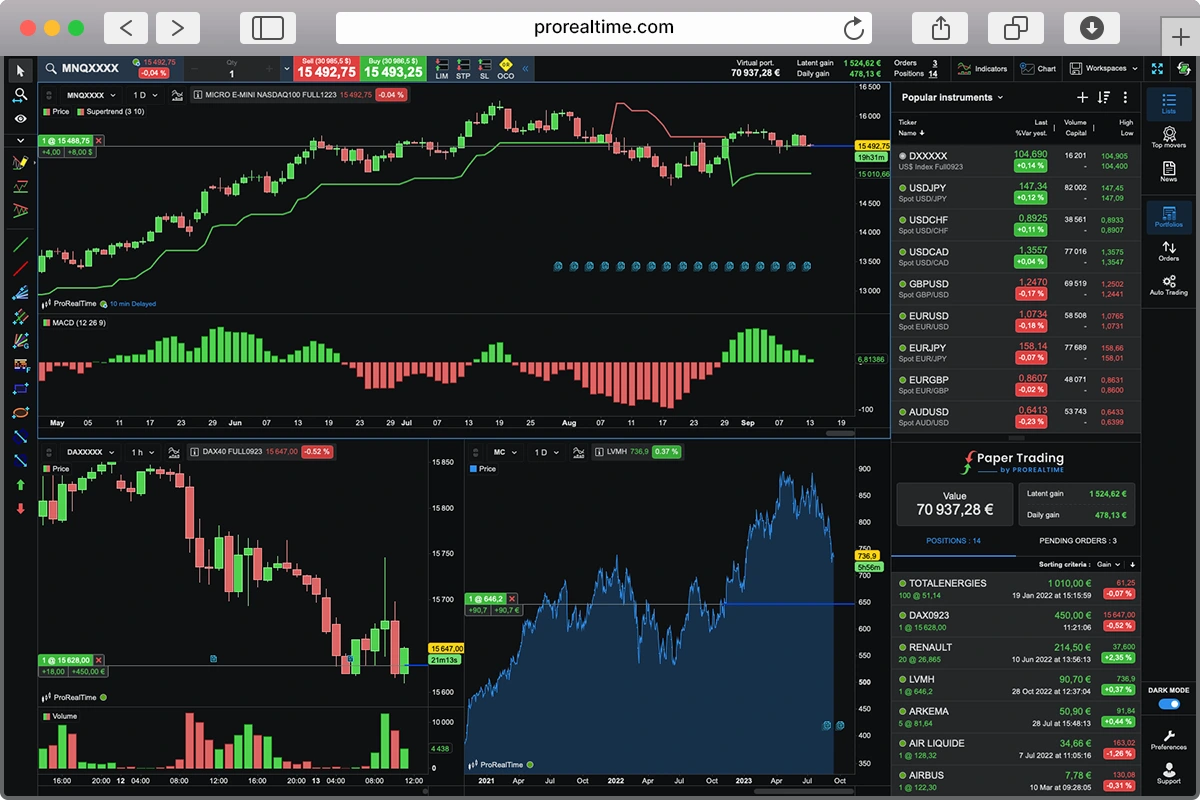
ProRealTime offers a more robust and professional-grade interface, catering to traders who require advanced analytical tools without paying extraordinary costs. Its layout is highly customizable, allowing for intricate setups that can accommodate complex trading strategies. Features like one-click trading directly from charts and a vast array of technical indicators make it a powerful tool for traders.

TradingView shines with its sleek, modern design and intuitive layout. Navigating between charts, indicators, and watchlists feels seamless, making it a favorite among traders who value a clean and responsive workspace. The platform’s flexibility allows for easy customization, enabling users to tailor their setup to their specific trading style. However, some users have noted that the abundance of features can be overwhelming at first, and certain advanced functionalities are locked behind a paid subscription.

Charting & analysis
We focus on the depth and usability of the charting engine: how many built-in indicators are available, whether you can overlay them, create custom timeframes, and switch between chart types without third-party add-ons. Drawing tools, visual clarity, and the ability to manage multi-timeframe setups matter too — especially for technical traders.
If you’re looking for a real powerhouse for your trading, ProRealTime is where it’s at, especially for those who want a truly professional setup. It’s loaded with over 100 built-in technical indicators and a comprehensive suite of drawing tools, including some intelligent automatic trend lines and support and resistance levels.
The most appealing aspect is its flexibility. You can experiment with custom timeframes and even explore non-time-based views, such as tick and volume charts. Additionally, being able to overlay indicators from different timeframes onto a single chart, or even create your own custom indices or spreads, really allows you to delve deeper into your analysis. It might take a bit more effort to get comfortable with its interface, but for serious technical traders, its features and precision are hard to beat.

On the flip side, if you’re after something super user-friendly that still packs a punch, TradingView is incredibly popular, and for good reason! Its interface is incredibly clean and intuitive, making charting feel like a walk in the park, even for those new to the game.
You gain access to over 400 built-in indicators immediately, and then there’s the massive collection of over 100,000 more shared by its community. You’ll be spoiled for choice! The platform supports all the usual chart types like candlestick, bar chart, and line chart,s and even the more exotic Heiken-Ashi, Renko, Point & Figure, and Kagi chart types.
Its clever drawing tools and pattern recognition smarts make even tricky analysis feel much simpler. Just a heads-up, some of the more advanced goodies, like complex multi-chart layouts or the most up-to-date real-time data or tick data, are part of their paid subscriptions, so that’s mostly the deal breaker between these two platforms.

Automation & backtesting
Automation should help you remove emotion and scale your process — not require a programming degree. We examine whether the platform supports no-code or simplified strategy building, the power and transparency of the backtesting engine, and whether strategies can run reliably (on servers versus your own machine). Clean reporting and ease of deployment also matter.
When it comes to automation and backtesting, ProRealTime truly shines if you’re after professional tools. Its ProBacktest feature allows you to delve into extensive historical data, providing detailed performance analytics and customizable reports.
You can visually build and tweak strategies with no code or dive into ProBuilder scripts for more precision. Plus, its ProOrder automation runs strategies server-side, meaning your trades execute reliably, even with your computer off. If you’re serious about optimizing your strategies, ProRealTime offers the depth and robustness you’re looking for.

TradingView takes a relatively lighter, more accessible approach. Its somewhat intuitive Pine Script language makes strategy more or less straightforward (not as straightforward as natural language), and the built-in Strategy Tester provides clear, easy-to-understand performance metrics. While it doesn’t offer built-in server-side automation, many traders rely on 3rd party integrations to automatically execute trades.

Market access
A good platform should support the assets you want to trade. We look at which asset classes are available (stocks, indices, forex, crypto, futures, etc.), whether they’re native to the platform or broker-dependent, and how easy it is to chart or place orders across different markets.
As it pertains to placing trades, ProRealTime excels due to its extensive market access. It hooks you up seamlessly with big name brokers like Interactive Brokers, Saxo Bank and IG, meaning you can trade pretty much everything: stocks, forex, commodities, futures, options, and even crypto, all under one roof. What’s great is that it doesn’t tie you down to a specific broker, giving you a ton of flexibility without making things complicated. So if you’re juggling different types of investments, it’s super handy.
TradingView, on the other hand, really knocks it out the park with its amazing global market data. If you’re all about diving deep into market insights and love top-notch charting, this is your jam. It serves up detailed, real-time data for stocks, forex crypto, and indices, and you can even link up with certain brokers to trade directly. Nevertheless, what you can actually trade can differ based on your broker and your location.
Broker compatibility
We assess how many brokers the platform connects to, how smooth that integration is, and whether it impacts execution quality, charting, or data. It’s not just about quantity — we’re also looking at the quality of those connections.
ProRealTime provides seamless integration with several leading brokers, including Interactive Brokers, IG, and Saxo Bank. These aren’t just basic links either, they’re really tight and smooth, meaning you can fire off trades right from your charts without any fuss. You could generally count on solid trade execution because of their pro-level setup, and the best part is you still get all of ProRealTime’s awesome charting and analysis tools, no matter which broker you’re with.
Similarly, TradingView allows connectivity with brokers, but there is more breadth here. Think names like TradeStation, OANDA, and Forex.com, so you’ve got plenty of options. Getting your orders in is usually pretty straightforward with these connections. The main thing to know is that not every feature works exactly the same across all brokers, and sometimes how your trades actually go through might depend on extra bits and pieces from other services.
Learning curve
How hard is it to go from “I just installed this” to “I can trade confidently”? We evaluate the platform’s documentation, in-app tooltips, tutorials, and whether the user community is helpful and active. Strong onboarding can make a complex tool feel manageable — especially if you’re new.
ProRealTime is a bit of a different beast. While it’s incredibly powerful, it doesn’t really hold your hand quite as much as some others out there. Because it’s packed with so many advanced features and really geared towards a professional crowd, you should definitely expect a steeper learning curve generally, especially if you’re just starting your trading journey.
Now don’t get me wrong, their documentation and YouTube videos are solid, and there’s a good knowledge base you can dig into. But to truly unlock its true potential—like mastering their ProBuilder language for custom indicators or getting deep into multi-timeframe backtesting—you’ll need to dedicate some serious screen time. It’s less “plug-and-play” and more of an investment in your skillset. However, for traders who are willing to put in that effort, the reward is a platform that can be tailored to your needs for some truly sophisticated analysis and trading.
Customer support is available through phone, which is a big plus compared to platforms that only offer ticketing systems or email. While you may not need to call them often, it’s reassuring to know real human help is just a call away—especially when dealing with complex setups or time-sensitive issues.
Now, if that sounds like a bit much, and you’re after something you can pick up more quickly, TradingView is probably the better bet. It’s got one of the most intuitive setups I’ve come across. You can pretty much open it up and get how things work. The menus are clean, you get helpful little tooltips, and there’s plenty of visual feedback so you’re not left guessing. What seals the deal for a smoother learning experience is the massive and super active community.
Seriously, if you hit a snag or want to try something new, chances are someone’s already made a video, written a guide, or even shared a Pine Script for it. If you’re fairly new to charting, you can go from just poking around to actually building out your own indicators or simple strategies in a surprisingly short amount of time.
Mobile & web access
Can you trade or monitor markets when you’re away from your desk? We look at mobile app quality, browser-based versions, charting on smaller screens, and whether core features (like alerts or order management) are preserved across devices.
ProRealTime offers a comprehensive and dominant desktop platform, no doubt about it, but when you move to its web or mobile versions, it doesn’t quite offer that same seamless, fluid experience you might find elsewhere. The browser-based version is certainly solid and gets the job done. However, it does feel more like a slightly adapted desktop workflow rather than something built from the ground up for ultra-flexible access. As for the mobile app, it’s functional enough for a quick check on your charts or to manage any open positions you have running. But if you’re looking for the full suite of analytical tools or a really rich charting experience on your phone, it’s a bit more limited. So, if you’re primarily a desk-based trader who just needs occasional mobile monitoring or to make minor adjustments, ProRealTime still holds its own and will serve you just fine.
TradingView generally sets a high bar for web and mobile access. Its browser platform is zippy and does a fantastic job of mirroring the desktop experience, making it easy to hop between devices. The mobile app is also really solid. It’s responsive, stable, and loaded with core features like alerts, good drawing capabilities, and even multi-chart views. Of course, trying to juggle multi-chart layouts on a tiny phone screen can sometimes feel a bit like threading a needle, and like any cloud-heavy platform, a flaky internet connection can spoil the party. But overall, for analyzing markets effectively on the move without major compromises, it’s still a top contender.
Other considerations
Aside from features and cost, consider these additional elements, particularly if you intend to use the platform daily.
Asset Variety
Just to note the assets available, both platforms bring plenty to the table but in different ways. ProRealTime, through its integrations with brokers like Interactive Brokers and IG, gives you direct access to a wide range of instruments like stocks, indices, forex, futures, options, commodities, and even some crypto. It’s a serious, all in one setup who need depth across asset classes.
Meanwhile TradingView shines with its extensive market data coverage. While actual trading access depends on your broker connection, you can chart just about anything, from global equities and forex to crypto and CFDs, all in one place. If you’re after broad analysis coverage, TradingView is fantastic. If you’re focused on executing trades across a wide mix of assets, ProRealTime has the edge.
Data Quality and Depth
Just to be clear about what data we’re talking about and how much we’ll have, ProRealTime is built with precision in mind. It offers professional grade, data feeds, including tick-by-tick historical data and extended intraday history, which makes it a favorite for serious technical traders and quants. You can also choose between free end-of-day data or premium real-time feeds depending on your needs.
Similarly, TradingView offers impressive global coverage with real-time or delayed data across a wide range of markets, making it perfect for quickly spotting trends across asset classes.
While ProRealTime edges ahead in terms of raw data granularity and backtesting reliability, TradingView holds its own with accessibility and breadth.
Although these differences may initially appear minor, their impact can become significant, particularly for traders who intend to use the platform regularly or aspire to expand their trading activities.
Overall winner
At the end of the day, both ProRealTime and TradingView are top-tier platforms, each with its strengths depending on how you trade. ProRealTime emphasizes power and precision, making it ideal for traders who seek in-depth analytics, advanced automation features, and professional-grade execution.
Conversely, TradingView delivers unmatched accessibility, a vibrant community, and seriously impressive charting across almost every market you can think of. Honestly, there’s no true loser here; your best move is to test drive both and see which one clicks with your workflow and trading style.

Cedric is a seasoned investment management strategist with over a decade of experience, currently working at TTUTC. He holds dual prestigious designations as a Chartered Market Technician (CMT) and Chartered Financial Analyst (CFA).