ProRealTime vs MetaTrader: Which Trading Platform Should you Pick?


Getting started in trading is already a big step. Your platform shouldn’t make it harder.
The right tool helps you see what’s happening in the market, test your ideas, and stay sharp as your skills improve. It’s not just about placing orders — it’s about how you work.
ProRealTime and MetaTrader are two names you’ll hear often. One offers deep charting and automation built for long-term growth. The other is free, simple, and available on almost every broker.
This comparison isn’t here to play favorites. But if you’re planning to stick with trading, it’s worth looking at what each one actually delivers when the learning curve flattens and routine sets in.
Our take
Verdict: It’s a clear edge for ProRealTime if you’re serious about trading and want tools that won’t hold you back.
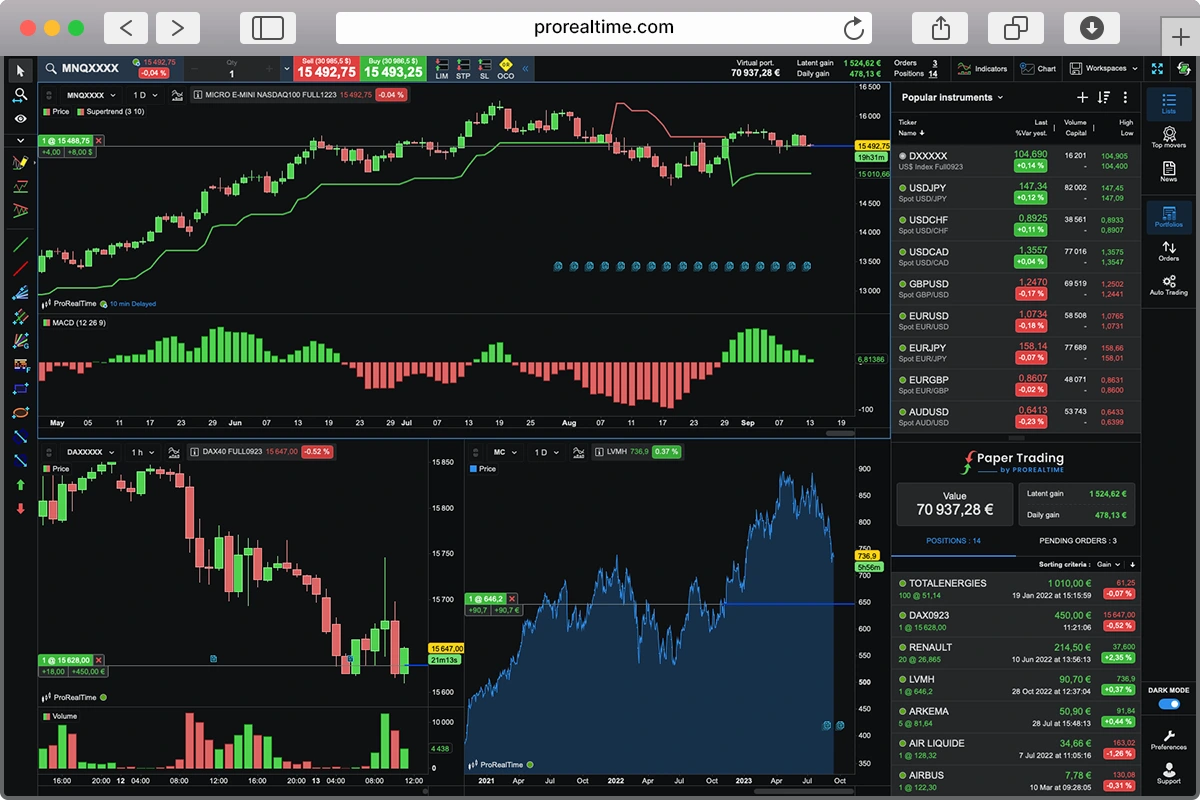
ProRealTime combines powerful charting, structured automation, and a free trading simulator that’s actually usable with no time restrictions on its web version. The platform feels built for traders who want to learn, test, and improve, not just place orders. Its modern layout, deep technical tools, and no-code strategy builder make it ideal for anyone planning to grow past the basics.
MetaTrader, on the other hand, remains a go-to in the forex and CFD world, mostly because it’s free for as long as you open a brokerage account, and all sorts of brokers widely support it. But that popularity hides real trade-offs. The interface is dated, customization often means coding, and even simple workflows can feel clunky. It’s serviceable, especially if your broker requires it, but it’s not the most helpful place to start if you’re still learning the ropes.
If you want a fast way to open charts and place trades, MetaTrader will get you there. But if you’re trying to actually understand the market and build good habits from day one, ProRealTime gives you more.
A Quick Overview


ProRealTime vs MetaTrader: A Detailed Comparison
Choosing the right trading platform comes down to how you like to trade — and what kind of experience you want as you learn.
ProRealTime and MetaTrader each bring something different to the table. One focuses on clean design, powerful built-in tools, and long-term growth. The other leans on widespread access and simplicity, though that simplicity often comes at the cost of flexibility.
We’ve broken down their key strengths and limitations to help you determine which platform best suits your style.
Platform interface & usability
This is your day-to-day workspace. We assess how flexible the layout is, whether you can customize it to match your workflow, and how easy it is to navigate core functions like placing trades, switching charts, and managing templates. The best platforms feel intuitive once you find your rhythm — not like you’re fighting the software.
ProRealTime offers a clean, modern layout that’s fully customizable. You can detach charts, create multi-window setups, and tailor the workspace to how you like to think and trade. Yes, there’s a bit of a learning curve — but once you find your flow, it’s efficient and intuitive.
MetaTrader, by contrast, feels dated. The layout is rigid, the charts sit inside one main window, and while basic functions are accessible, doing anything beyond that gets clunky fast. Adjusting indicators, saving templates, or managing multiple charts often feels more technical than it should.
In summary:
MetaTrader will do the job — if you’re okay working around its limitations.
But if layout matters to you, and you want a workspace that adapts to your process, ProRealTime is just easier to work with.
 ProRealTime wins this round
It’s faster to grow into — and a lot less frustrating to use.
ProRealTime 1, MetaTrader 0
Charting & analysis
We focus on the depth and usability of the charting engine: how many built-in indicators are available, whether you can overlay them, create custom timeframes, and switch between chart types without third-party add-ons. Drawing tools, visual clarity, and the ability to manage multi-timeframe setups matter too — especially for technical traders.
ProRealTime really shines for traders who prioritize a rich, visually clear charting experience. It offers over 100 built-in indicators, a wide range of drawing tools as well as custom timeframes and multiple chart types without needing extra plugins. The platform also stands out for its seamless multi-timeframe management and ability to create custom indicators using its proprietary ProBuilder language, which is a big plus for more advanced users.

Metatrader’s charting is a bit more basic. It only comes with about 30 built-in indicators. However there are lots more available via the community. The drawing tools are basic and the chart types are standard. Similar to other platforms you can script your own indicators with MQL4/5 but that comes with a steep learning curve. Nonetheless, MetaTrader’s charting engine feels a bit dated compared to ProRealTime’s more modern and intuitive layout.
 ProRealTime wins this round
ProRealTime 2, MetaTrader 0
Automation & backtesting
Automation should help you remove emotion and scale your process — not require a programming degree. We look at whether the platform supports no-code or simplified strategy building, how powerful and transparent the backtesting engine is, and whether strategies can run reliably (on servers vs. your own machine). Clean reporting and ease of deployment also matter.
For ProRealTime, automation is a standout feature for traders who prefer a streamlined, no-code approach. Its intuitive interface allows users to build basic strategies visually, and for those who enjoy coding and more intricate strategies, the ProBuilder language offers flexibility. The platform’s backtesting engine is robust, utilizing tick-by-tick data for precise simulations. Additionally, ProRealTime’s server side execution ensures that your strategies run reliably, even when your computer is off, providing a peace of mind for those who value consistent performance.

On the other hand, for MetaTrader, automation and backtesting capabilities revolve around Expert Advisors (EAs), which require programming in MQL 4/5. While this approach offers deep customization, it is seen as a huge hurdle for novice traders and non-programmers. Despite this the backtesting in MetaTrader is solid, though it may not match the granularity of ProRealTime’s tick-level simulations. Moreover, running EAs typically requires your computer to be on, unless you opt for a VPS solution.

 ProRealTime wins this round
ProRealTime 3, MetaTrader 0
Market access
A good platform should support the assets you actually want to trade. We look at which asset classes are available (stocks, indices, forex, crypto, futures, etc.), whether they’re native to the platform or broker-dependent, and how easy it is to chart or place orders across different markets.
ProRealTime offers a comprehensive range of financial instruments including stocks, indices, forex, commodities, futures,options and even cryptocurrencies. These securities are attained through integrations with multiple brokers like IG, Interactive Brokers, and Saxo Bank.
MetaTrader also supports a wide array of assets. However, the specific instruments available can vary depending on the broker you choose, which can limit your variability.
ProRealTime 4, MetaTrader 0
Broker compatibility
We assess how many brokers the platform connects to, how smooth that integration is, and whether it impacts execution quality, charting, or data. It’s not just about quantity — we’re also looking at the quality of those connections.
When it comes to broker integration, ProRealTime offers a streamlined experience by partnering with a select group of highly reputable brokers like Interactive Brokers and Saxo Bank. This focused approach ensures tight integration, allowing for seamless order execution and high quality data feeds directly from exchanges. Traders benefit from consistent charting and reliable execution, as the platform is designed to work harmoniously with its chosen brokers. This setup is particularly advantageous for those who prioritize stability and precision in their trading activities.
In contrast, MetaTrader boasts a vast network of broker connections, providing traders with a wide array of choices. This flexibility allows users to select brokers that best fit their trading needs. However, the quality of integration can vary significantly between brokers. Since MetaTrader relies on broker-provided data feeds and execution services, the trading experience can differ based on the broker’s infrastructure and support. Therefore, while MetaTrader offers broader broker access, traders should carefully evaluate each broker’s performance to ensure optimal charting accuracy and execution quality.
ProRealTime wins this round
ProRealTime 5, MetaTrader 0
Learning curve
How hard is it to go from “I just installed this” to “I can trade confidently”? We evaluate the platform’s documentation, in-app tooltips, tutorials, and whether the user community is helpful and active. Strong onboarding can make a complex tool feel manageable — especially if you’re new.
As it pertains to getting up to speed, ProRealTime offers a user-friendly experience, especially for those new to trading platforms. It provides a comprehensive suite of video tutorials covering everything from basic navigation to advanced features like automated trading and backtesting. The platform’s intuitive design, combined with in-app tooltips and a supportive community, helps users build confidence quickly. On top of that, resources like ProRealCode offer extensive documentation and forums for users seeking deeper insights or assistance.

On the other hand, MetaTrader has a much steeper learning curve, especially for beginners. While there is a vast array of features and customization options, new users might find the interface quite cumbersome. However, there’s a wealth of external resources available, including detailed guides and tutorials, to help users navigate the platform. The active MetaTrader community also serves as a valuable support network, offering advice and shared experiences to assist newcomers in mastering the platform.

ProRealTime 6, MetaTrader 0
Mobile & web access
Can you trade or monitor markets when you’re away from your desk? We look at mobile app quality, browser-based versions, charting on smaller screens, and whether core features (like alerts or order management) are preserved across devices.
Regarding mobile trading, ProRealTime offers a clean and intuitive experience tailored for traders who want to stay connected on the go. The mobile app allows you to place and manage trades directly from your phone, with orders and positions visible on the charts. The app also supports real-time alerts, so you can set price or indicator based notifications and receive push alerts where you are.
Both MT4 and MT5 provide robust mobile apps for iOS and Android, offering a comprehensive suite of trading tools. The apps support real-time quotes and customizable alerts, ensuring you stay informed about market movements.
ProRealTime wins this round
ProRealTime 7, MetaTrader 0
Other considerations
Beyond features and pricing, there are a few other factors worth thinking about — especially if you’re planning to use the platform every day.
Asset Variety
If you’re an active trader who likes to move between markets, say from forex to stocks to commodities, ProRealTime makes that transition pretty seamless. MetaTrader can get you there too, but your asset access depends heavily on the broker you’re using. That means two (2) traders using MT5 might see very different instruments. In practice, this makes ProRealTime a more convenient choice if you’re aiming for flexibility without the extra hassle.
So if having broad, reliable, access to multiple markets matters to you, ProRealTime keeps things simpler and more consistent.
Data Quality and Depth
For traders who rely on clean, accurate data to make decisions, especially intraday or backtesting strategies, ProRealTime has a bit of an edge. You’re getting direct exchange data with full tick-by-tick history so what you see on the chart is exactly what happened in the market. MetaTrader, on the flip side, depends on the broker for its data feed, which means quality and depth can be hit or miss.
That makes ProRealTime the safer bet if your strategy depends on data precision and consistency.
These may seem like small differences at first, but they can add up — especially if you plan to use the platform consistently or want to scale your trading over time.
Overall winner: ProRealTime
ProRealTime sets itself apart with its clean interface, advanced charting, and built-in automation — all without requiring code. It’s a platform that supports real learning, serious testing, and smoother execution, whether you’re trading on a demo or scaling into real capital.
MetaTrader, while still widely used, shows its age. It offers fast access for forex traders and a large ecosystem of custom tools, but its rigid interface and reliance on third-party workarounds make it harder to grow with — especially for beginners.
Looking to get started? Try the free ProRealTime Web simulator or explore MetaTrader through your broker and see which platform fits your workflow best.

Cedric is a seasoned investment management strategist with over a decade of experience, currently working at TTUTC. He holds dual prestigious designations as a Chartered Market Technician (CMT) and Chartered Financial Analyst (CFA).