NinjaTrader Review 2026: Features, Pricing, and Honest Verdict


Kraken paid $1.5 billion for NinjaTrader in 2025. That kind of number makes you pay attention to what’s under the hood.
NinjaTrader has been the default platform for US futures day traders since 2003. Over 2 million accounts, C#-based strategy automation, and some of the lowest futures commissions in the industry. It has a loyal following among scalpers and algo traders who need raw execution speed and deep customization.
In January 2026, NinjaTrader opened its doors to European traders through a CySEC-regulated brokerage. So we put it through a full NinjaTrader review to see if the hype matches the reality.
Here’s what we cover:
- Pricing tiers and the hidden fees nobody mentions upfront
- Automated trading: NinjaScript (C#) and Strategy Builder
- Order flow tools and the SuperDOM
- How it stacks up against the main competitors
- Whether the new European brokerage is ready for prime time
Our Take on NinjaTrader
If you trade futures and want serious automation tools, NinjaTrader deserves a serious look. C# strategy development, a tick-level backtesting engine, and commissions as low as $0.09/side on micro contracts (Lifetime plan). That combination explains why it has dominated US retail futures for two decades.
But that focus is also its biggest constraint. NinjaTrader only does futures. No stocks, no spot forex, no ETFs. The desktop app runs on Windows only. The learning curve is steep. And the European brokerage launched in January 2026, so the track record there is thin.
NinjaTrader is a futures-focused trading platform and brokerage founded in 2003, with over 2 million accounts. It features C#-based strategy automation (NinjaScript), tick-level backtesting, order flow tools (Order Flow+), and commissions from $0.09/side on micro contracts. Available in Europe since January 2026 via CySEC-regulated Payward Europe (Kraken).
About NinjaTrader:
Founded in 2003 in Denver, Colorado. Acquired by Kraken for $1.5 billion in May 2025. Regulated by CFTC/NFA (US) and CySEC 342/17 (EU via Payward Europe). Over 2 million accounts. Futures only. Windows desktop, web, and mobile apps.
Who Is NinjaTrader For?
Not sure if NinjaTrader fits your trading style? Here’s the quick filter.
You’ll get the most out of it if you are:
- A futures scalper who lives on the SuperDOM and needs one-click execution at 25ms refresh
- An algo trader who wants to code strategies in C# (not a proprietary language) and backtest against tick-level historical data
- An order flow trader who needs footprint charts, volume profile, and cumulative delta on futures
- A cost-conscious futures trader looking for commissions starting at $0.09/side on micro contracts
Look elsewhere if you are:
- A beginner. The learning curve is real, and futures are leveraged instruments with amplified risk on both sides.
- A stock or ETF trader. NinjaTrader’s brokerage is futures only. You can connect it to Interactive Brokers for other assets, but at that point you’re using two platforms.
- A Mac user. The desktop app is Windows only. Web and mobile exist but have fewer features.
- A European trader who wants a proven local broker. The EU brokerage is two months old. ProRealTime and TradingView have years of European track record.
NinjaTrader is a specialist tool. It does one thing (futures) and does it with more depth than almost anything else at the retail level. If that’s your market, read on.
NinjaTrader: A Quick Overview
Most trading platforms launched in the 2010s. NinjaTrader has been around since 2003. That makes it one of the oldest retail futures platforms still actively developed, predating TradingView by nearly a decade.
Founded in Denver, Colorado, NinjaTrader grew into the dominant platform for US retail futures trading. Over 2 million accounts have been created, and an ecosystem of 1,000+ third-party vendors builds indicators, strategies, and tools for the platform.
In March 2025, crypto exchange Kraken announced it was acquiring NinjaTrader for $1.5 billion, the largest deal ever bridging crypto and traditional finance. The acquisition closed in May 2025. NinjaTrader continues as a standalone platform, but the long-term roadmap includes crypto futures, stocks, and options across both platforms.
In January 2026, NinjaTrader launched its European brokerage through Payward Europe (Kraken’s CySEC-regulated entity), starting with the Netherlands and Germany. France and Italy are expected later in 2026.
| Founded | 2003, Denver, Colorado |
| Accounts | 2+ million |
| Owner | Kraken (since May 2025) |
| Markets | Futures (CME, CBOT, Eurex) |
| Regulation (US) | CFTC / NFA |
| Regulation (EU) | CySEC 342/17 (via Payward Europe) |
| Desktop | Windows only |
| Web & Mobile | Yes (iOS, Android) |
Is NinjaTrader Legit?
Trust matters more than features when you’re about to deposit real money with a broker. NinjaTrader’s picture is mixed.
Regulation
In the US, NinjaTrader is registered as a Futures Commission Merchant (FCM) with the CFTC and is a member of the NFA. That’s the standard regulatory setup for US futures brokers.
In Europe, the brokerage runs through Payward Europe Digital Solutions (CY) Limited, authorized by CySEC under license 342/17. This is Kraken’s existing European entity. The CySEC license dates back to 2017, though it was originally held by a different firm (I.F. Greenfields Wealth Ltd) before Kraken acquired and rebranded it.
That CySEC license gives NinjaTrader passporting rights across 29 EU/EEA countries. For now, the brokerage accepts clients in the Netherlands and Germany only.
The NFA fine
In November 2024, the NFA filed a complaint against NinjaTrader Clearing LLC for anti-money laundering failures. The specifics: 475+ accounts had been opened for customers in countries on NinjaTrader’s own blocked list. The case settled in May 2025 with a $250,000 fine. NinjaTrader neither admitted nor denied the allegations.
A $250K fine is not catastrophic for a company valued at $1.5 billion, but it signals that compliance controls were not keeping pace with growth. For a platform expanding into Europe under MiFID oversight, that’s a detail worth watching.
Kraken ownership
Kraken is one of the largest crypto exchanges globally. The acquisition gives NinjaTrader deep financial backing and a path toward multi-asset trading. It also ties a futures platform’s future to a crypto company’s strategic priorities. Whether that’s reassuring or concerning depends on how you view the crypto industry’s regulatory trajectory.
What actual users say
Trustpilot: 3.7/5 from 1,063 reviews. The rating distribution tells a story: 70% give 5 stars, 19% give 1 star. Almost nobody rates it 2, 3, or 4.
The 5-star reviews are overwhelmingly praise for individual support agents. The pattern suggests NinjaTrader actively solicits reviews after resolving support tickets. Very few 5-star reviews discuss the platform itself.
The 1-star reviews cluster around three issues:
- Withdrawal delays. The most serious complaint. Multiple users report waiting weeks, with some cases stretching past a month.
- Hidden fees. The $25-35/month inactivity fee catches traders who log in but don’t place a trade. Wire withdrawals cost $30 each.
- Platform stability. Reports of lag and execution errors during volatile sessions. For a platform built around fast execution, instability during high-volatility moments is the worst time to have it.
NinjaTrader is a regulated, established platform with a 20+ year history. The Kraken acquisition adds financial muscle. But the withdrawal complaints and AML fine are real flags, especially in Europe where the brokerage has zero track record. Start with the free simulation and test with small amounts before committing significant capital.
Plans and Pricing
The platform is free. What you’re actually paying for is lower per-contract commissions (see full pricing). That distinction matters.
| Free | Monthly ($99/mo) | Lifetime ($1,499) | |
|---|---|---|---|
| Standard futures | $1.29/side | $0.99/side | $0.59/side |
| Micro futures | $0.39/side | $0.29/side | $0.09/side |
| Order Flow+ | $59/mo extra | $59/mo extra | Included |
| Platform fee | $0 | $99/mo | $1,499 one-time |
The Free plan includes every feature: charting, backtesting, simulation, and live trading. The only difference is higher per-contract commissions. If you trade enough volume, the Monthly or Lifetime plans pay for themselves quickly. Prices shown are as of March 2026. Check the official pricing page for current rates.
What the pricing page doesn’t emphasize
Commissions are only one part of the cost. Factor in:
- Inactivity fee: $25-35/month if you log in without completing a trade. One round-turn per month waives it.
- Wire withdrawal: $30 per transfer (domestic and international). ACH is free but slower.
- Exchange fees: ~$0.19/contract (CME) plus routing fees (~$0.25/contract). These apply on top of commissions.
- Market data: CME data is included with a funded account. Eurex data costs extra (~$23/month plus exchange fees).
- Order Flow+: $59/month unless you’re on the Lifetime plan.
A real cost example
A European trader on the Free plan, trading 10 micro E-mini contracts per day (20 sides):
- Commissions: 20 x $0.39 = $7.80
- Exchange + routing: 20 x $0.44 = $8.80
- Daily total: ~$16.60
That’s competitive for futures. But once you add Eurex data, Order Flow+, and the occasional inactivity fee, the “free platform” can cost $100-150/month in practice. Budget the full picture, not the headline commission rate.
Comparing NinjaTrader with Competitors
How does NinjaTrader stack up against the platforms European traders are most likely to consider?
| NinjaTrader | ProRealTime | TradingView | cTrader | |
|---|---|---|---|---|
| Best for | Futures algo trading | Multi-asset screening | Charting + social | Forex/CFD algo |
| Markets | Futures only | Stocks, futures, forex, CFDs | Multi-asset (via brokers) | Forex, CFDs |
| Automation language | C# (NinjaScript) | ProBuilder (proprietary) | Pine Script | C# (cBots) |
| Server-side execution | No (runs on your PC) | Yes (runs on PRT servers) | No | Yes (cTrader Cloud) |
| Order flow | Full suite ($59/mo) | Basic | Basic | Limited |
| Backtesting | Tick-level + optimization | Bar-level | Bar-level | Tick-level |
| Desktop | Windows only | Web-based | Web-based | Web + Windows |
| Mac support | No | Yes | Yes | Yes |
| EU regulation | CySEC (Jan 2026) | AMF (France) | Not a broker (charting software) | Via brokers (CySEC, FCA) |
| Trustpilot | 3.7/5 | 4.2/5 | 1.5/5 | 4.5/5 |
NinjaTrader vs ProRealTime: Both handle futures automation. ProRealTime runs strategies server-side (your PC can be off), has a simpler programming language, and has years of European track record. NinjaTrader has deeper order flow tools, more powerful C# automation, and lower futures commissions. If you want proven simplicity and server-side execution, ProRealTime. If you want maximum automation depth and order flow analysis, NinjaTrader.
NinjaTrader vs TradingView: Many serious futures traders use both. TradingView for broad market scanning and analysis across all asset classes, NinjaTrader for futures execution and order flow. You can also connect NinjaTrader as a broker inside TradingView ($9.99/month), which gives you TradingView’s interface with NinjaTrader’s execution and commissions.
NinjaTrader vs cTrader: Both use C# for automation, but they target different markets. cTrader handles forex and CFDs with cloud execution. NinjaTrader handles futures with local execution. If you trade futures, NinjaTrader. If you trade forex or CFDs, cTrader. There is no overlap.
Charting and Analysis Tools
What if the charting is actually the least impressive part of NinjaTrader? Compared to the automation and order flow tools, it’s good but not exceptional.
NinjaTrader includes over 100 built-in indicators, 10+ chart types, and 30+ drawing tools. Every indicator is open-source at the code level. If you know C#, you can modify any built-in indicator or write your own from scratch.

The workspace is fully customizable: multiple monitors, linked chart groups, custom color schemes, and saved layouts. Market Analyzer scans across instruments in real time using custom conditions.
One useful add-on: TradingView chart integration for $9.99/month. This routes orders through NinjaTrader directly from TradingView charts. You get TradingView’s modern charting (which most traders prefer visually) combined with NinjaTrader’s execution engine and low commissions.
The third-party ecosystem adds another layer. Over 1,000 vendors sell custom indicators, chart tools, and trading apps through the NinjaTrader Ecosystem marketplace. If a specific indicator doesn’t exist natively, someone has probably built it.
Where it falls short: the desktop interface. Multiple users describe it as looking like early 2000s Windows software. Menus are nested deep, configuration panels are dense. TradingView and cTrader look significantly more modern. The web version is cleaner but strips out many features. If visual polish matters to you, the TradingView integration is the workaround.
Automated Trading and Backtesting
This is where NinjaTrader pulls ahead of most retail platforms. The automation toolset is genuinely deep, and it’s the main reason experienced futures traders choose it.
NinjaScript (C#)
NinjaTrader’s automation language is C#, the same language used in professional software development. That means full access to .NET libraries, no proprietary syntax to learn (if you already know C#), and the ability to build indicators, strategies, and custom order management systems.
All built-in indicators include their source code, which you can read and modify. This is rare. Most platforms treat their indicators as black boxes.
The trade-off: C# has a steeper learning curve than Pine Script (TradingView) or ProBuilder (ProRealTime). If you’ve never written code, NinjaScript will take weeks to get comfortable with. That’s where the Strategy Builder comes in.
Strategy Builder
A no-code alternative. You create strategies through dropdown menus: select entry conditions from a list of indicators, set parameters, define exit rules. The Strategy Builder generates the NinjaScript code behind the scenes, which you can then inspect and modify.
It works well for straightforward strategies (moving average crossovers, breakout entries, indicator-based signals). Complex multi-condition logic or portfolio-level strategies will hit its limits quickly.
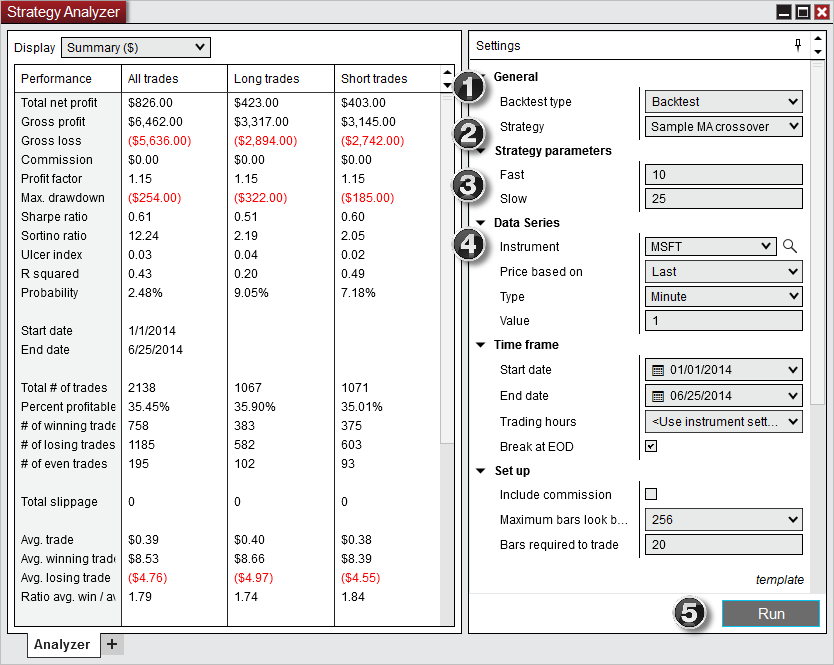
Backtesting (Strategy Analyzer)
Strategy Analyzer tests strategies against historical data at the tick level, not just on bar closes. That distinction matters for strategies where entry/exit timing within a candle affects the result.
It also includes:
- Walk-forward optimization (test parameter sets on unseen data)
- Multi-objective parameter optimization
- Detailed performance metrics (win rate, max drawdown, Sharpe ratio, profit factor)
Market Replay goes further. You can replay entire trading sessions tick by tick and practice executing as if it were live. This is useful for discretionary traders who want to build execution skills without risking capital.
The ecosystem advantage
The 1,000+ vendor ecosystem includes pre-built strategies, signal services, and tools like Build Alpha that can generate NinjaScript code from machine learning analysis. No other futures platform has a third-party ecosystem this large.
Best for: Traders who want full programmatic control over their futures automation. Skip if: You need server-side execution. NinjaTrader strategies run on your machine (or a VPS you manage). ProRealTime and cTrader both run strategies in the cloud, meaning they keep working when your computer is off.
Order Flow and SuperDOM
Most charting platforms show you what happened. Order flow tools show you what’s happening right now inside the order book. If that distinction matters to your trading, NinjaTrader has one of the most complete retail toolsets available.
SuperDOM
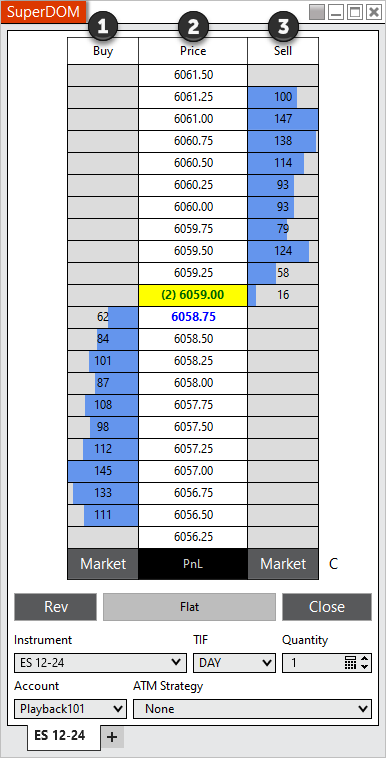
The SuperDOM (Depth of Market) is a price ladder built for speed. You see live bid/ask volume at every price level and can place, modify, or cancel orders with a single click. The refresh rate runs at 25ms, which matters for scalpers reacting to real-time order book shifts.
You can attach custom indicators directly to the SuperDOM columns: P&L, volume delta, cumulative delta, or any NinjaScript-based calculation. For active futures scalpers, the SuperDOM is where they spend most of their screen time.
Order Flow+
This is NinjaTrader’s premium order flow add-on ($59/month, included with the Lifetime plan). It adds:
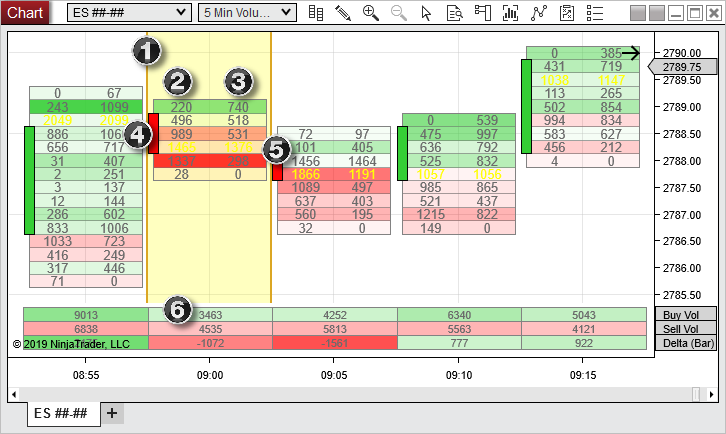
- Volumetric (footprint) bars. Buy and sell volume at each price level within a candle. You see whether buyers or sellers were in control at each tick.
- Volume profile. Volume distribution across price levels over a session or custom period. High-volume nodes often act as support and resistance.
- Cumulative delta. Running total of buy versus sell market orders. Divergence between price and delta can signal exhaustion or hidden strength.
How it compares
NinjaTrader’s order flow is solid but not the deepest on the market. Bookmap’s liquidity heatmap is more intuitive for reading order book depth. Sierra Chart’s Numbers Bars and delta divergence tools go deeper for advanced analysis.
But here’s the key difference: neither Bookmap nor Sierra Chart is a full brokerage. You still need a separate broker for execution. NinjaTrader bundles order flow, charting, execution, and brokerage in one platform. For traders who want fewer moving parts, that integration matters. If order flow is your primary edge and you want the absolute best visualization, consider running Bookmap alongside NinjaTrader for the best of both.
User Experience and Accessibility
The desktop platform is powerful but visually stuck in the mid-2000s. If you’ve been using TradingView or cTrader, the first impression will be jarring.
Desktop (Windows only)
This is the full NinjaTrader experience. Multi-monitor layouts, NinjaScript editor, Strategy Analyzer, full SuperDOM, and access to every add-on. If you’re serious about the platform, the desktop is where you’ll spend your time.
The trade-off is the interface. Menus are nested several layers deep. Configuration panels are dense with options. New users report spending several days just setting up their workspace. NinjaTrader publishes hundreds of tutorial videos and runs daily webinars, which helps, but expect a real learning investment upfront.
System requirements: Windows only. No native Mac app. Mac users can run Windows through Boot Camp or a virtual machine (Parallels, VMware), but that adds friction and potential performance issues. For many European traders used to web-based platforms, this is a dealbreaker.
Web
A browser-based version that works on any OS, including Mac. It includes TradingView chart integration, basic order entry, and account management. It does not include NinjaScript, Strategy Analyzer, or the full SuperDOM.
Think of the web version as a lightweight companion for monitoring and basic trades, not a replacement for the desktop.
Mobile (iOS and Android)
Native apps for checking positions, placing orders, and monitoring your account on the go. Charting is functional but limited. Several users report the order modification interface is clunky: you tap arrows to adjust rather than drag, which slows things down.
The mobile app is not designed for active trading sessions. It’s for quick checks and adjustments when you’re away from your desk.
If you plan to use NinjaTrader primarily from a Mac or a mobile device, this is not the right platform. The real NinjaTrader experience lives on the Windows desktop.
Paper Trading and Simulation
Want to test everything before spending a cent? NinjaTrader’s free tier makes that possible with no strings attached.
The free plan includes:
- Live market data from CME (for funded accounts) or end-of-day data via Kinetick (no account needed)
- Every charting tool, indicator, and drawing tool
- Full backtesting with Strategy Analyzer
- Market Replay for tick-by-tick historical playback
- Simulated trading with realistic fills
There’s no time limit. You can paper trade for months without paying anything or providing payment details. Most platforms either restrict free simulation to a trial period or require a deposit.
NinjaTrader also runs Arena, a simulated trading competition where traders compete for cash prizes. It’s a lower-pressure way to benchmark your skills against other traders.
If you’re considering NinjaTrader, the free sim is the obvious starting point. You get access to every feature (including automation and order flow) without committing capital. There’s no reason not to test it before deciding.
Final Words
NinjaTrader is one of the deepest retail platforms for futures automation and order flow. C# programming, tick-level backtesting, a 1,000+ vendor ecosystem, and commissions that undercut most competitors. For futures-focused traders who want depth over breadth, nothing else at the retail level matches it.
The trade-offs are clear. Futures only. Windows only. A dated interface with a steep learning curve. An EU brokerage with two months of track record. Hidden fees that can add $100-150/month if you’re not careful. And withdrawal complaints that warrant caution.
For European traders specifically: NinjaTrader is now accessible through a CySEC-regulated entity, but the European operation is brand new. If you want a proven platform for futures automation in Europe, ProRealTime is the safer choice today. If you want the deepest automation and order flow tools available and you’re comfortable with a US-born platform establishing itself in Europe, NinjaTrader is worth testing.
Start with the free simulation. It costs nothing and gives you full access to every feature. That’s the best way to find out whether NinjaTrader fits your trading.
FAQ
Is NinjaTrader free?
Partially. Charting, backtesting, and simulation trading are completely free with no time limit. Live trading requires paying commissions: from $0.39/side on micro contracts (Free plan) down to $0.09/side (Lifetime plan at $1,499 one-time). There is no monthly platform fee on the Free plan. The Monthly ($99/mo) and Lifetime plans reduce your per-contract costs and the Lifetime plan includes Order Flow+ ($59/month value).
Can I use NinjaTrader in Europe?
Yes. NinjaTrader launched a European brokerage in January 2026 through Payward Europe, regulated by CySEC (license 342/17). It currently accepts clients in the Netherlands and Germany, with France and Italy planned for later in 2026. European traders can fund accounts in EUR or USD via SEPA transfer. The platform software (charting, simulation) has been available worldwide for years. What’s new is the regulated EU brokerage with direct account opening and SEPA deposits.
Does NinjaTrader work on Mac?
Not natively. The desktop app requires Windows. Mac users can run it through Boot Camp or a virtual machine (Parallels, VMware), but performance may suffer. The web version works on any OS through a browser, though it has fewer features than the desktop (no NinjaScript, no Strategy Analyzer, no full SuperDOM). The mobile apps work on both iOS and Android.
Is NinjaTrader good for beginners?
Not really. The platform is built for experienced traders. The desktop interface has a steep learning curve, futures are leveraged products with amplified risk, and the sheer number of configuration options can overwhelm newcomers. NinjaTrader does publish extensive tutorials and runs daily live webinars. But platforms like TradingView or ProRealTime are much more approachable for someone starting out. If you’re determined to learn NinjaTrader, start with the free simulation to practice without financial risk.
NinjaTrader vs TradingView: which is better for futures?
Different tools for different needs. TradingView is better for multi-asset charting, market scanning, and community analysis. It works on any device and is far easier to learn. NinjaTrader is better for futures execution, order flow analysis, and C#-based strategy automation. Many serious futures traders use both: TradingView for analysis and scanning, NinjaTrader for execution and automation. You can connect NinjaTrader as a broker inside TradingView ($9.99/month) to get TradingView’s interface with NinjaTrader’s execution and commission rates. If you want the best of both worlds with server-side execution, ProRealTime runs strategies on its own servers and covers futures, stocks, and forex.

Maxime holds two master’s degrees from the SKEMA Business School and FFBC. As founder and editor-in-chief of NewTrading.fr, he writes daily about financial trading.
Start Trading on a Demo Account with
ProRealTime Paper Trading Simulator.